
Visualizing the Median Problem: Median Class and Probability
Loading the math board and drawing, please wait…
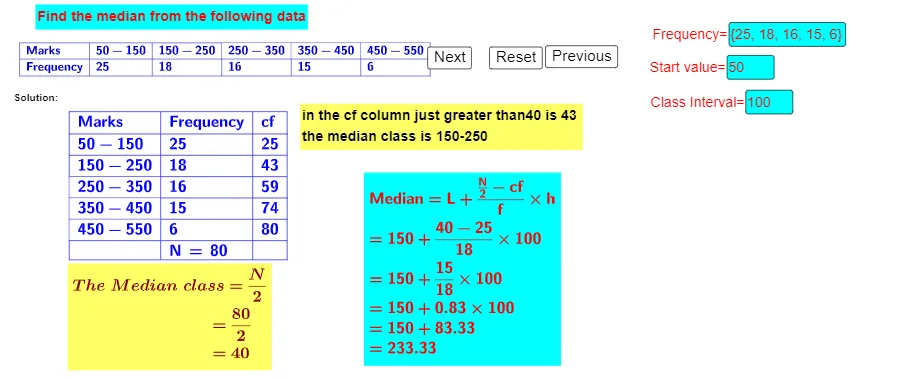
This example graphically demonstrates how the median (median class) is located by balancing left and right cumulative quantities over an interval, and it connects that idea to probability/statistics reasoning. The key math concepts include the definition of the median, locating a central value from ordered/classified data, and the use of upper/lower cumulative sums that relate naturally to interval-sum (Riemann-sum-like) thinking. In GeoGebra, the construction is driven by commands referenced in the build summary: Element, Sum, TableText, If, and Textfield. Text objects (e.g., text1/text2/text3) are created for labeling and step explanations, while Textfield and If allow conditional control of parameters (such as m and h). Sum is used to compute cumulative quantities over discretized sub-intervals, and TableText together with groups of points/segments (the A/B/C-labeled objects) provides the final annotated results. Suitable for middle-school through high-school students studying statistics and probability & statistics, especially for understanding and teaching the median via dynamic visualization.
GeoGebra Commands & Parameters
Element(f, 1) → B9Element(f, 2) → B10Element(f, 3) → B11Element(f, 4) → B12Element(f, 5) → B13Sum(B9:B13) → B16TableText({{A8, A9, A10, A11, A12, A13}, {B8, B9, B10, B11, B12, B13}}, "|_llllll") → text2TableText({{A8, B8, C8}, {A9, B9, C9}, {A10, B10, C10}, {A11, B11, C11}, {A12, B12, C12}, {A13, B13, C13}, {A14, B14, C14}}, "|_lll") → text3If(0 ≤ mp ≤ C9, 0, If[C9 < mp ≤ C10, C9, If[C10 < mp ≤ C11, C10, If[C11 < mp ≤ C12, C11, If[C12 < mp ≤ C13, C12]]]]) → cfIf(0 ≤ mp ≤ B9, 0, If[C9 < mp ≤ C10, B10, If[C10 < mp ≤ C11, B11, If[C11 < mp ≤ C12, B12, If[C12 < mp ≤ C13, B13]]]]) → FIf(0 ≤ mp ≤ C9, A9, If[C9 < mp ≤ C10, A10, If[C10 < mp ≤ C11, A11, If[C11 < mp ≤ C12, A12, If[C12 < mp ≤ C13, A13]]]]) → CIIf(0 ≤ mp ≤ C9, A2, If[C9 < mp ≤ C10, A3, If[C10 < mp ≤ C11, A4, If[C11 < mp ≤ C12, A5, If[C12 < mp ≤ C13, A6]]]]) → LTextfield(f) → InputBox1Textfield(m) → InputBox2Textfield(h) → InputBox3If(0 ≤ mp ≤ C9, C9, If[C9 < mp ≤ C10, C10, If[C10 < mp ≤ C11, C11, If[C11 < mp ≤ C12, C12, If[C12 < mp ≤ C13, C13]]]]) → q
AI Drawing Prompt Reference
Create a statistical graph to visualize how the median is located by balancing left and right cumulative quantities. The graph includes a function curve, multiple data points, and regions, with annotations indicating cumulative amounts, the median position, and probabilities. Start by plotting the function curve and basic data points, then calculate and display the left and right cumulative quantities, marking the median position and corresponding cumulative values, and finally include text explanations to describe the relationship between the median and cumulative quantities.
The prompt above was compiled from the original drawing commands and is for reference only.