
Cylinder Volume Calculation
Loading the math board and drawing, please wait…
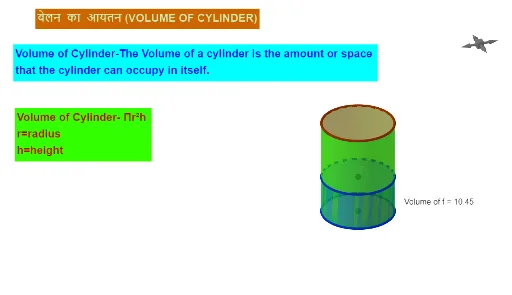
This example demonstrates the calculation and visualization of cylinder volume. It involves core mathematical concepts such as the cylinder volume formula, circle area, quadratic functions, real number operations, and equation solving. Key GeoGebra commands and objects used include Intersect, Circle, Point, Cylinder, Volume, PointIn, and parameters like r, A, c, B, a, d, e, b, h, P, f, g, k, i, text elements, and volume calculations. It is suitable for high school mathematics education, helping students understand the derivation of the cylinder volume formula, parametric calculations, geometric constructions, and animations.
GeoGebra Commands & Parameters
Intersect(xAxis, yAxis) → ACircle(A, r) → cPoint(zAxis) → BCylinder(B, A, r) → a, d, e, bCylinder(P, A, r) → f, g, k, iVolume(f) → volumefPointIn(i) → Pointi_{1}Volume(f) → jPointIn(i) → Pointi_{2}Volume(f) → lPointIn(i) → Pointi_{3}Volume(f) → mPointIn(i) → Pointi
AI Drawing Prompt Reference
Draw a cylinder, first draw a circle c with center A and radius r, then take a point B on the z-axis and draw a cylinder a with B as the base center and A as the apex. Next, take three points on i and calculate the volumes j, k, and m of the corresponding cylinders.
The prompt above was compiled from the original drawing commands and is for reference only.