
Geometric Construction and Visualization of Cylinder Volume
Loading the math board and drawing, please wait…
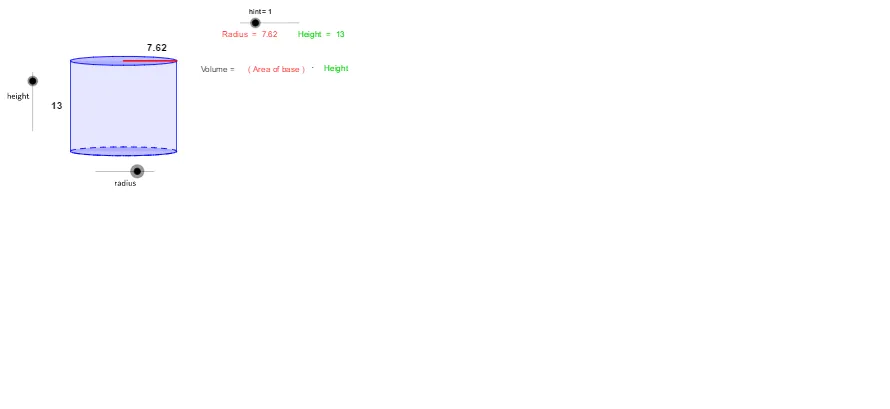
This example demonstrates, in GeoGebra, how to build a cylinder model using geometric parameters and visualize how the cylinder’s volume depends on those dimensions. It centers on core ideas from solid geometry and calculus-related reasoning: the circle geometry behind the base (radius) and the volume relationship V = πr²h, together with the common setup used in constrained optimization problems. Construction highlights: it uses Intersect to compute key intersection points, Vector and Translate to generate corresponding spatial placements, Segment and Arc to draw defining edges and circular boundaries, Polygon to assemble the cylinder outline/cross-section structure, and Root plus Midpoint to determine key parameter values and locations. The scene also includes text labeling (ShowText*) and a computed volume readout (volume, ShowAnswerAnchor). Suitable for advanced high-school geometry, early college geometry/modelling, and calculus classes that connect geometric constraints to optimization workflows.
GeoGebra Commands & Parameters
Intersect(c, xAxis, 1) → AIntersect(c, xAxis, 2) → BVector((-17, 0), ((-17), b)) → uTranslate(c, u) → dTranslate(A, u) → CTranslate(B, u) → DSegment(A, C) → eSegment(B, D) → fArc(c, A, B) → gPolygon(C, D, B, A) → P, c_1, d_1, b_1, a_1Intersect(xAxis, yAxis) → ESegment(E, B) → hTranslate(E, u) → E'Translate(B, u) → B'Segment(E', B') → iRoot(32) → FMidpoint(i) → GMidpoint(e) → H
AI Drawing Prompt Reference
Draw an upright cylinder with its base circle centered at the origin, intersecting the x‑axis at left and right points; show the base radius as a segment from the origin to the right intersection. Translate the base circle vertically by a given height to obtain the top circle, and connect the corresponding left and right points with vertical edges. Sketch the half‑arc of the base circle between the two intersections, and form a quadrilateral from the four points to suggest the lateral surface. Also draw the top radius from the translated origin to the translated right point, indicate the height value (e.g., √32), and mark the midpoints of a vertical edge and the top radius.
The prompt above was compiled from the original drawing commands and is for reference only.