
GeoGebra Construction of a Cuboid’s Volume
Loading the math board and drawing, please wait…
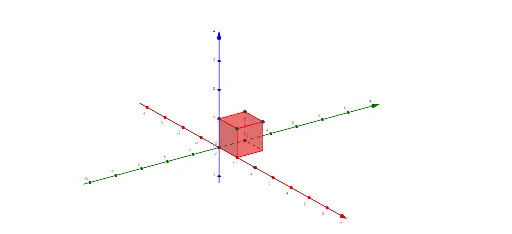
This example demonstrates how to build a cuboid (using a cube-based geometric model as well) in GeoGebra and use the 3D construction to connect the cuboid’s volume with its edge lengths. The key math ideas are solid geometry and the volume relationship V = length × width × height, expressed through geometric modeling rather than purely symbolic calculation. Construction highlights: the model is created with GeoGebra commands such as Cube and Polygon to form the cuboid’s faces and connecting edges. Points (e.g., k_1, k_2, k_3, A–H) and labeled vertex/edge variables (a, b, c, d, e, f, g, h and their indexed counterparts like a_1, b_1, c_1, d_1, etc.) are used to define and parameterize the geometry. Multiple polygon objects (poly1–poly6) represent the different visible faces, making it easy to visually relate the three perpendicular dimensions to the final volume concept. Suitable for middle school solid-geometry lessons, classroom demonstrations, and geometry construction practice.
GeoGebra Commands & Parameters
Polygon(A, B, C, D) → poly1, a, b, c, dPolygon(A, E, F, B) → poly2, a_1, e, f, b_1Polygon(F, G, C, B) → poly3, f_1, g, c_1, b_2Polygon(G, H, D, C) → poly4, g_1, h, d_1, c_2Polygon(H, E, A, D) → poly5, h_1, e_1, a_2, d_2Polygon(F, G, H, E) → poly6, f_2, g_2, h_2, e_2Cube((0, 0, 0), (1, 0, 0), (1, 1, 0)) → i, I, face5, faceJKLM, edge2, edge1, edge4, edge6, edge3, edgeIM, edgeJM, edgeJK, J, edge5, edgeKL, edge7, edgeLM, K, L, M, face1, face3, face2, face4
AI Drawing Prompt Reference
Draw a 3D cuboid with eight vertices, four on the top and four on the bottom. Start by sketching the bottom rectangle, then the top rectangle, and connect corresponding vertices with four vertical edges to form six visible faces. Use distinct colors or transparencies for each face, and label the three mutually perpendicular edges as length, width, and height. Place a unit cube nearby as a reference to visually show that volume equals length times width times height. Keep the layout clear for easy observation of face-edge relationships.
The prompt above was compiled from the original drawing commands and is for reference only.