
Fraction Multiplication Visualization
Loading the math board and drawing, please wait…
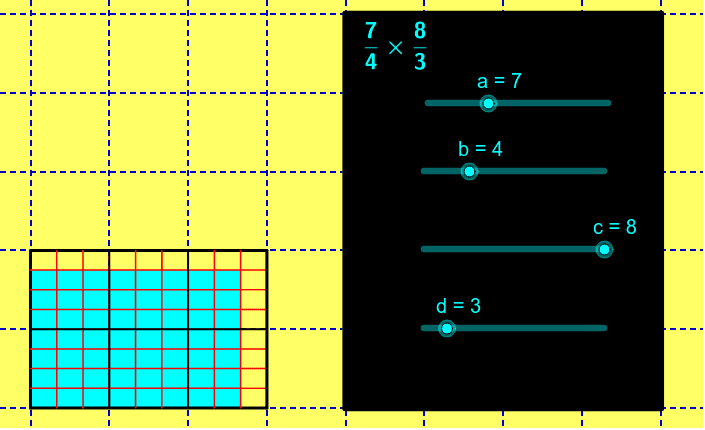
This example visually demonstrates the multiplication of two fractions using dynamic geometry. It covers core concepts like fraction multiplication, geometric representation, and ratios. Constructed with GeoGebra commands such as Polygon, Sequence, and Segment, it is suitable for middle school and above mathematics education to intuitively understand fraction multiplication operations.
GeoGebra Commands & Parameters
Polygon(F, D, C, A) → poly2, f_1, d_1, c_1, a_2Sequence((0, i), i, 1, floor(a / b)) → list1Sequence((x(C), i), i, 1, floor(a / b)) → list2Sequence(Segment[Element[list1, i], Element[list2, i]], i, 1, a - 1) → list3Sequence((i / d, 0), i, 1, x(C) * d - 1) → list4Sequence((i / d, ceil(a / b)), i, 1, x(C) * d - 1) → list5Sequence(Segment[Element[list4, i], Element[list5, i]], i, 1, d * d_2) → list6Segment(E, B) → gPolygon(G, H, I, J) → poly3, g_1, h, i, jSegment(G, H) → kSegment(H, I) → lSegment(I, K) → mSegment(K, G) → nSequence((i, 0), i, 1, floor(c / d)) → list7Sequence((i, ceil(a / b)), i, 1, floor(c / d)) → list8Sequence(Segment[Element[list7, i], Element[list8, i]], i, 1, floor(c / d)) → list9Sequence((0, i / b), i, 1, ceil(a / b) * b - 1) → list10Sequence((x(C), i / b), i, 1, ceil(a / b) * b - 1) → list11Sequence(Segment[Element[list10, i], Element[list11, i]], i, 1, ceil(a / b) * b - 1) → list12Polygon(L, M, N, O) → poly1, l_1, m_1, n_1, o
AI Drawing Prompt Reference
Visualize the multiplication of two fractions using dynamic geometry by first drawing a polygon. Create two sequences of points and use them to generate several line segments, forming a grid-like structure. Then, draw another set of line segments on one side of the grid to form a second polygon. Finally, combine the two polygons to demonstrate the geometric meaning of fraction multiplication.
The prompt above was compiled from the original drawing commands and is for reference only.