
Geometric Intersection of Circle and Square with Stochastic Visualization
Loading the math board and drawing, please wait…
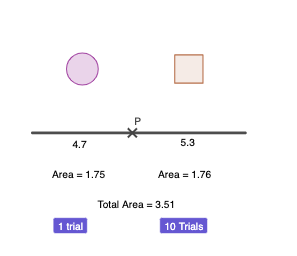
This example demonstrates how a circle (notably in a unit-circle context) and a square interact: key intersection points are constructed and visualized, and the setup is paired with a stochastic-visual approach (point clouds and distribution-style plots) to compare outcomes. The main mathematical ideas include unit-circle geometry, computing intersections between a circle and polygonal/rectangular shapes, and relating these constructions to function-based mappings (including power functions and sequences) that drive graphing or parameter evolution. Construction highlights in GeoGebra include using Intersect with Point/Segment to generate the defining points and edges, building the circle with Circle, forming the square via Polygon/rectangle tools, and presenting results with BoxPlot and DotPlot for distribution-like views. Interactive controls (buttons) and annotations (text objects) support switching scenarios, while the model tracks multiple objects (points, segments, a polygon poly1, and labels) to connect geometric structure with stochastic visualization. Suitable for advanced secondary education through undergraduate-level learning in geometry construction, graphing, and intuitive probability & statistics.
GeoGebra Commands & Parameters
Intersect(xAxis, yAxis) → APoint(xAxis) → BSegment(A, B) → fSegment(A, P) → gSegment(P, B) → hCircle((x(Midpoint[A, P]), 3), g / ((2 * pi))) → cPolygon(C - (a / 2, a / 2), C + (a / 2, ((-a)) / 2), 4) → poly1BoxPlot(-2, 0.5, D) → eDotPlot(D, true) → l1
AI Drawing Prompt Reference
Draw a geometric intersection between a unit circle and a square. The circle has its center at the origin with radius 1. The square has a side length of 2 and is centered. Calculate the intersection points between the circle and the square, and connect these points with line segments. Present the resulting figure and add random point clouds and distribution plots to visualize the outcomes.
The prompt above was compiled from the original drawing commands and is for reference only.