
Bride of the Nile: A Construction from Circles, Arcs, and Intersections
Loading the math board and drawing, please wait…
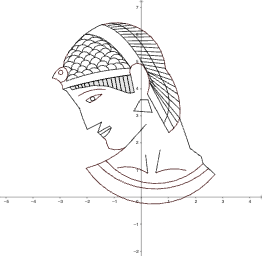
This GeoGebra example demonstrates how to build a distinctive, sectioned geometry figure (the “Bride of the Nile” style) by using circles, circumcircle arcs, and systematically computed intersection points. The mathematical focus is on geometric construction principles: circle and arc relationships, constructing dependent points via intersection constraints, and assembling segments and polygons into a coherent diagram. Key construction workflow comes from the provided commands: Point (creating key points such as A1, B1, C, D and others), CircumcircleArc (drawing circumcircle arcs), Segment (forming connecting edges), Circle (defining the underlying circles), Polygon (joining vertices into the main shape), and Intersect (computing intersection points to drive the next steps). Suitable for middle school through early university learners, it works well for lessons on geometric construction, coordinate-free reasoning, and visualization-based math modeling.
GeoGebra Commands & Parameters
Point(f) → CPoint(f) → DCircumcircleArc(H, I, L) → cPoint(hr3) → MCircumcircleArc(L, E, M) → dCircumcircleArc(N, O, P) → eCircumcircleArc(Q, R, S) → kSegment(Q, T) → jCircumcircleArc(T, U, S) → pSegment(W_1, V) → lPoint(hd1) → D_1Point(hd1) → H_1Point(hd1) → I_1Point(hd1) → K_1Point(hd1) → M_1Point(hd1) → N_1Point(hd1) → Q_1Point(hd1) → L_2Point(hd1) → M_2Point(hd1) → N_2Point(hd1) → O_2Segment(P_2, Q_2) → nSegment(R_2, S_2) → rSegment(T_2, U_2) → sSegment(S_2, T_2) → tSegment(R_2, U_2) → aCircumcircleArc(Q_2, V_2, W_2) → r_1Segment(A_3, B_3) → bSegment(C_3, D_3) → a_1CircumcircleArc(B_3, E_3, F_3) → q_2CircumcircleArc(D_3, G_3, H_3) → r_2CircumcircleArc(I_3, J_3, Q_2) → s_2CircumcircleArc(Z_2, K_3, L_3) → t_2CircumcircleArc(L_3, M_3, I_3) → c_3Segment(W, N_3) → b_1Segment(N_3, C_1) → c_1Segment(C_1, Z) → f_3Segment(Z, W) → g_3Segment(M, O_3) → h_3Segment(Q_3, R_3) → j_3Segment(R_3, S_3) → k_3CircumcircleArc(W_2, T_3, S_3) → d_3CircumcircleArc(G_1, D, U_3) → e_3Point(r_1) → V_3CircumcircleArc(V_3, W_3, R_3) → p_3Point(r_1) → Z_3Point(k_3) → B_4CircumcircleArc(Z_3, A_4, B_4) → q_3Segment(C_4, D_4) → l_3Point(hr1) → E_4CircumcircleArc(M, E_4, D_4) → r_3Segment(U_1, H_4) → m_3CircumcircleArc(I_4, J_4, K_4) → t_3Segment(K_4, H_4) → n_3Segment(I_4, L_4) → a_3CircumcircleArc(L_4, M_4, F) → c_4Circle(N_4, O_4) → d_4Point(h) → P_4CircumcircleArc(P_4, R_1, F) → e_4CircumcircleArc(F, Q_4, J_4) → f_4CircumcircleArc(U_3, R_4, C_4) → g_4Segment(V, R_2) → b_3Point(hd2) → E_5Point(hd2) → H_5Point(f_4) → P_5Point(hd1) → J_1Polygon(O_2, H_2, I_2, N_2) → q1, o_2, h_2, i_2, n_2Polygon(N_2, M_2, J_2, I_2) → q2, m, m_2, j_2, f_1Polygon(M_2, L_2, K_2, J_2) → q3, g_1, l_2, k_2, h_1Polygon(L_2, Q_1, G_2, K_2) → q4, i_1, q_1, g_2, j_1Polygon(Q_1, P_1, F_2, G_2) → q5, k_1, p_1, f_2, l_1Polygon(P_1, O_1, E_2, F_2) → q6, m_1, o_1, e_2, n_1Polygon(O_1, N_1, D_2, E_2) → q7, s_1, t_1, d_2, d_1Polygon(N_1, M_1, C_2, D_2) → q8, e_1, a_2, c_2, b_2Polygon(M_1, L_1, B_2, C_2) → q9, i_4, j_4, l_4, m_4Polygon(L_1, K_1, A_2, B_2) → q10, n_4, a_4, b_4, i_5Polygon(K_1, J_1, Z_1, A_2) → q11, j_5, l_5, z_1, m_5Polygon(J_1, I_1, T_1, Z_1) → q12, n_5, a_5, b_5, g_6Polygon(I_1, H_1, S_1, T_1) → q13, h_6, i_6, j_6, k_6Polygon(H_1, D_1, E_1, S_1) → q14, l_6, m_6, n_6, p_6Polygon(D_1, G_1, F_1, E_1) → q15, q_6, r_6, s_6, t_6Segment(Z_2, U_2) → a_6Segment(P_3, Q_3) → iPoint(f) → BPoint(f) → G_6Point(h) → I_6Point(h) → J_6Point(q) → K_6Point(hr4) → L_6Point(l_3) → M_6CircumcircleArc(K_6, L_6, M_6) → q_7CircumcircleArc(G, L_5, M_5) → s_3Point(hd2) → F_6CircumcircleArc(L_5, E_6, F_6) → h_4CircumcircleArc(E_6, N_6, O_6) → k_4CircumcircleArc(N_6, P_6, Q_6) → p_4Point(hd2) → S_6CircumcircleArc(P_6, R_6, S_6) → q_4CircumcircleArc(R_6, T_6, U_6) → r_4CircumcircleArc(T_6, V_6, W_6) → s_4Point(f) → Z_6Point(f) → A_7CircumcircleArc(V_6, Z_6, A_7) → t_4Point(s_3) → H_7Point(h_4) → I_7CircumcircleArc(H_7, B_7, I_7) → c_5Point(k_4) → J_7CircumcircleArc(I_7, C_7, J_7) → d_5CircumcircleArc(J_7, D_7, P_6) → e_5Point(r_4) → G_7CircumcircleArc(P_6, E_7, G_7) → f_5CircumcircleArc(G_7, F_7, V_6) → g_5Point(g_5) → K_7CircumcircleArc(K_7, L_7, Z_6) → h_5CircumcircleArc(B_7, M_7, C_7) → k_5CircumcircleArc(C_7, N_7, D_7) → p_5CircumcircleArc(D_7, O_7, E_7) → q_5CircumcircleArc(E_7, P_7, F_7) → r_5CircumcircleArc(F_7, Q_7, L_7) → s_5Intersect(c_4, e_4, 1) → R_7CircumcircleArc(R_7, S_7, B_7) → t_5CircumcircleArc(R_7, T_7, M_7) → c_6CircumcircleArc(M_7, U_7, N_7) → d_6CircumcircleArc(N_7, V_7, O_7) → e_6CircumcircleArc(O_7, W_7, P_7) → f_6CircumcircleArc(T_7, A_8, U_7) → d_7CircumcircleArc(U_7, B_8, V_7) → e_7CircumcircleArc(V_7, C_8, W_7) → f_7CircumcircleArc(W_7, D_8, Z_7) → g_7CircumcircleArc(A_8, F_8, B_8) → h_7CircumcircleArc(B_8, G_8, C_8) → k_7CircumcircleArc(C_8, H_8, D_8) → p_7CircumcircleArc(F_8, I_8, G_8) → r_7CircumcircleArc(G_8, J_8, H_8) → s_7CircumcircleArc(H_8, K_8, Z_7) → t_7CircumcircleArc(P_4, L_8, F_8) → c_8CircumcircleArc(L_8, M_8, I_8) → d_8CircumcircleArc(R_1, N_8, A_8) → e_8Point(r_7) → P_8CircumcircleArc(P_8, O_8, J_8) → f_8CircumcircleArc(J_8, Q_8, K_8) → g_8Point(h) → S_8CircumcircleArc(S_8, R_8, O_8) → h_8CircumcircleArc(O_8, T_8, Q_8) → k_8Point(h) → U_8CircumcircleArc(R_8, U_8, T_8) → p_8CircumcircleArc(P_7, V_8, Q_7) → c_7CircumcircleArc(K_8, E_8, Q_7) → q_8Segment(K_4, O_2) → i_3Circle(W_8, Z_8) → r_8
AI Drawing Prompt Reference
Draw a geometric figure composed of multiple circles, arcs, and line segments. Start by identifying several key points, then draw arcs of several circles. Obtain new points by calculating the intersections of these arcs, connect the points with line segments to form polygons, and finally assemble these parts into a coherent whole, demonstrating the relationships between circles and arcs and how to construct complex geometric shapes using intersection points.
The prompt above was compiled from the original drawing commands and is for reference only.