
Constructing a Rhombus: Inscribed in an Ellipse, Circumscribing a Circle
Loading the math board and drawing, please wait…
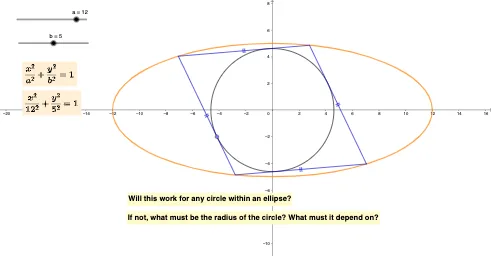
This example demonstrates how to construct a rhombus that is simultaneously inscribed in an ellipse and circumscribes (is tangent to) a circle. It highlights the geometric interplay between an ellipse and a circle under strict tangency/containment constraints, producing a consistent configuration of vertices and side lines. The key mathematics includes inscribed/circumscribed relationships, tangency conditions (via tangent lines), and how a rhombus’s sides can be positioned to satisfy circle tangency while remaining within the ellipse. The GeoGebra construction (from the provided command set) uses Polygon to form the rhombus candidates, Circle and Point to define the ellipse-related circle objects and key points, OrthogonalLine for auxiliary perpendicular lines, Intersect to locate intersection points that determine vertices and side directions, Tangent to enforce tangency between the circle and the rhombus sides, and Segment to assemble the sides. The setup leverages multiple intermediate objects/variables to complete the step-by-step geometric construction. Suitable for high school advanced geometry and early college coordinate/constructive geometry, especially for learning how tangency and curve constraints can uniquely drive a configuration in GeoGebra.
GeoGebra Commands & Parameters
Polygon(A, B, C) → t1, c, a_1, b_1OrthogonalLine(C, c) → fIntersect(f, c) → DCircle(C, D) → dPoint(d) → ETangent(E, d) → g,Intersect(eq1, g, 1) → FIntersect(eq1, g, 2) → GTangent(F, d) → h, iTangent(G, d) → j, kIntersect(eq1, h, 2) → HIntersect(eq1, k, 2) → ISegment(H, I) → lSegment(H, F) → mSegment(F, G) → nSegment(G, I) → p
AI Drawing Prompt Reference
On the same plane, construct an ellipse-related configuration that yields a rhombus: start by creating an initial polygonal frame from two key points, then draw an auxiliary perpendicular line and find its intersection with the given curve/constraint to define a circle. Choose the corresponding point on that circle and construct the tangent line at that point; use the intersections of this tangent with the pre-existing constraint line(s) to determine several key vertices. Next, construct tangents from two other intersection-derived points on the circle, intersect those tangents with the constraint line(s) again to obtain the remaining vertex pair, and connect the vertices with segments to form the four sides of the rhombus. The result should show the rhombus sides positioned to be tangent to the circle while the vertex locations are governed by the ellipse-related constraints.
The prompt above was compiled from the original drawing commands and is for reference only.