
Exploring Properties of Dilations
Loading the math board and drawing, please wait…
In collections
Similarity Part 2
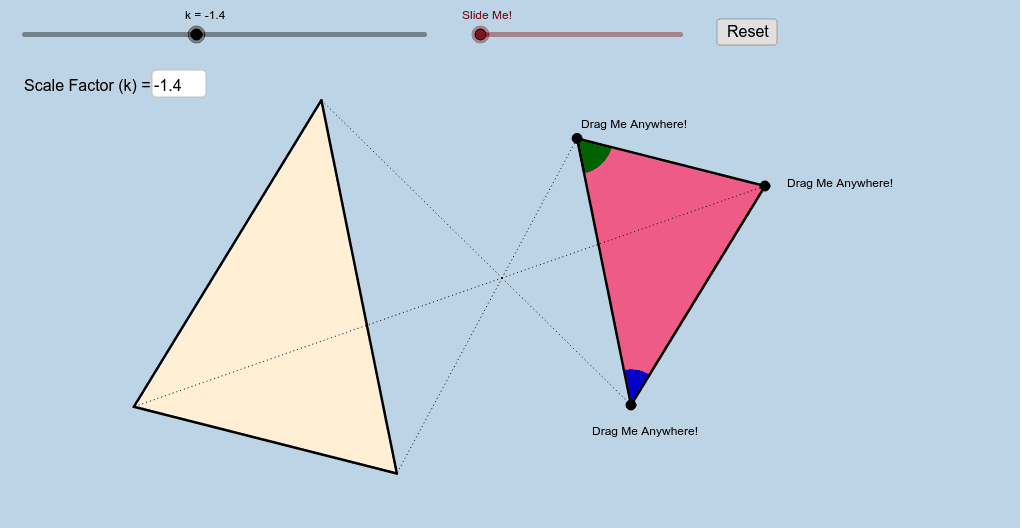
This example demonstrates how dilation maintains shape and proportion through interactive operations, covering core concepts like dilation, similarity, and ratio relationships. It uses commands like Polygon, Segment, Textfield, Dilate, Circle, Intersect, CircleSector, Vector, Translate, Angle, Rotate, suitable for high school students learning geometric transformations.
GeoGebra Commands & Parameters
Polygon(A, B, C) → poly1, c, a, bSegment(A, B) → dSegment(B, C) → eSegment(C, A) → fTextfield(k) → InputBox1Dilate(A, k, O) → A'Dilate(B, k, O) → B'Dilate(C, k, O) → C'Polygon(A', B', C') → poly1', c', a', b'Dilate(A, k, O) → A'_1Dilate(B, k, O) → B'_1Segment(A'_1, B'_1) → d'Dilate(B, k, O) → B'_2Dilate(C, k, O) → C'_1Segment(B'_2, C'_1) → e'Dilate(C, k, O) → C'_2Dilate(A, k, O) → A'_2Segment(C'_2, A'_2) → f'Segment(O, A') → gSegment(O, A) → hSegment(O, B) → iSegment(O, B') → jSegment(O, C') → lSegment(O, C) → mCircle(A, 1) → pCircle(B, 1) → sIntersect(p, f, 1) → DIntersect(p, d, 1) → EIntersect(s, d, 1) → FIntersect(s, e, 1) → GCircleSector(A, D, E) → tCircleSector(B, F, G) → c_1Dilate(A, If[0 < n ≤ 1, 1 - n, 0], A') → A'_3Dilate(B, If[1 < n ≤ 2, 2 - n, 0], B') → B'_3Vector(B, B'_3) → uVector(A, A'_3) → vTranslate(t, v) → t'Translate(c_1, u) → d_1Angle(D, A, E) → αCircleSector(A, E, D) → e_1CircleSector(B, G, F) → f_1Translate(e_1, v) → g_1Translate(f_1, u) → h_1Dilate(A, If[0 < o ≤ 1, 1 - o, 0], A') → A'_4Vector(A, A'_4) → wDilate(B, If[2 < o ≤ 3, 3 - o, 0], B') → B'_4Vector(B, B'_4) → qTranslate(e_1, w) → rRotate(r, If[1 < o ≤ 2, (((o - 1) * 180))°, 180°], A') → r'Translate(f_1, q) → k_1Rotate(k_1, If[3 < o ≤ 4, (((o - 3) * 180))°, 180°], B') → p_1Translate(t, w) → t'_1Rotate(t'_1, If[1 < o ≤ 2, (((o - 1) * 180))°, 180°], A') → q_1Translate(c_1, q) → r_1Rotate(r_1, If[3 < o ≤ 4, (((o - 3) * 180))°, 180°], B') → s_1
AI Drawing Prompt Reference
Draw triangle ABC, then perform a similarity transformation centered at point O with scaling factor k to observe how the transformed triangle A'B'C' maintains its shape and proportions. Next, draw circles centered at points A and B, find their intersections with lines f and d to get points D and E, and with lines e and d to get points F and G, and construct circular arcs and sectors. Finally, adjust scaling factors n and o to observe the transformation effects.
The prompt above was compiled from the original drawing commands and is for reference only.