
Dilating a Segment: Geometric Transformation Demonstration
Loading the math board and drawing, please wait…
In collections
Similarity Part 1
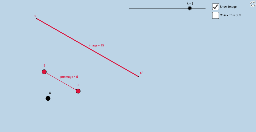
This example illustrates the effect of dilation on a line segment using GeoGebra. The key mathematical concepts include similarity transformation, proportional scaling, and coordinate transformations. Construction involves using commands like Line, Dilate, Intersect, and objects such as Point, Vector to visualize the scaled segment. Suitable for middle school students or geometry teaching.
GeoGebra Commands & Parameters
Line(B, C) → mDilate(m, k, O) → m'Intersect(m, t) → O_1Line(O, C) → fCircle(C, 2) → gIntersect(m', f) → ECircle(E, 2) → hIntersect(g, m, 2) → FIntersect(g, f, 2) → GIntersect(h, m', 2) → HIntersect(h, f, 2) → IIntersect(g, m, 1) → JIntersect(g, f, 1) → KCircleSector(C, F, G) → qAngle(F, C, G) → αAngle(J, C, G) → βCircleSector(C, J, G) → cIntersect(h, m', 1) → NDilate(C, 1 - i, E) → C'_3Vector(C, C'_3) → uTranslate(q, u) → q'Translate(c, u) → c'Circle(O, 2) → eSegment(B, C) → preimageDilate(B, k, O) → B'_2Dilate(C, k, O) → C'_1Segment(B'_2, C'_1) → imageDilate(B, k, O) → B'Dilate(C, k, O) → C'Point(m') → ARay(C', A) → jPoint(j) → DPoint(m) → PRay(C, P) → lPoint(l) → Q
AI Drawing Prompt Reference
Draw a plane figure starting with a center point O and two points B and C, forming the segment BC and the line through B and C. Perform a dilation about O by a given scale factor k to obtain the dilated line m'. Construct several intersection-driven circles: include a circle centered at C with radius 2 and another circle centered at the key intersection point E on m', then intersect these circles with the relevant lines to obtain points that determine two circular sectors (with angles comparable to α and β). Use those sector boundaries to guide where the intersection points lie, and then display the dilation effect by drawing the original segment BC alongside the dilated segment with endpoints B' and C'. Finally add rays from C' in the directions through the constructed points to indicate the transformed orientation.
The prompt above was compiled from the original drawing commands and is for reference only.