
Exploring Dilation: Scale Factor and Image Transformation
Loading the math board and drawing, please wait…
In collections
Similarity Part 1
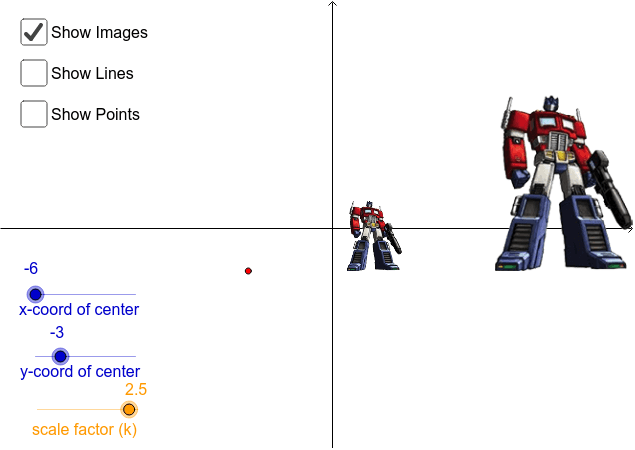
This GeoGebra worksheet demonstrates how to perform center dilation (similarity transformation) on a triangle. Students can drag a slider to change the scale factor k and observe how the triangle's image changes in size; they can also move the center of dilation to see its effect on the transformed figure. Key mathematical concepts include similar figures, geometric transformations, and the relationship between scale factor and area (area scales with the square of k). The construction uses the Dilate, Segment, and Line commands to create the original triangle ABC and its image A'B'C' after dilation by factor k about center (xc, yc). Text labels display current parameter values. This interactive resource is suitable for middle school geometry transformation units or as a visual aid for introducing transformation matrices in high school coordinate geometry.
GeoGebra Commands & Parameters
Segment(K, A) → aDilate(pic3, k, B) → pic3'Line(B, K) → bLine(B, A) → cDilate(K, k, B) → K'Dilate(A, k, B) → A'Segment(K', A') → a'Segment(B, K') → dSegment(B, A') → eSegment(K', K) → iSegment(K, B) → jSegment(A', A) → lSegment(A, B) → mSegment(B, K) → nSegment(B, A) → p
AI Drawing Prompt Reference
Draw a triangle and add a slider to adjust the scale factor. After changing the scale factor with the slider, show the image of the triangle after dilation centered at a point outside the triangle. Also display the lines connecting the center of dilation to the vertices of the original triangle, and the intersection points of the edges and connecting lines before and after dilation. Label the current scale factor and coordinates of key points.
The prompt above was compiled from the original drawing commands and is for reference only.