
Dynamic Illustration of Similar Triangles
Loading the math board and drawing, please wait…
In collections
Similarity Part 2
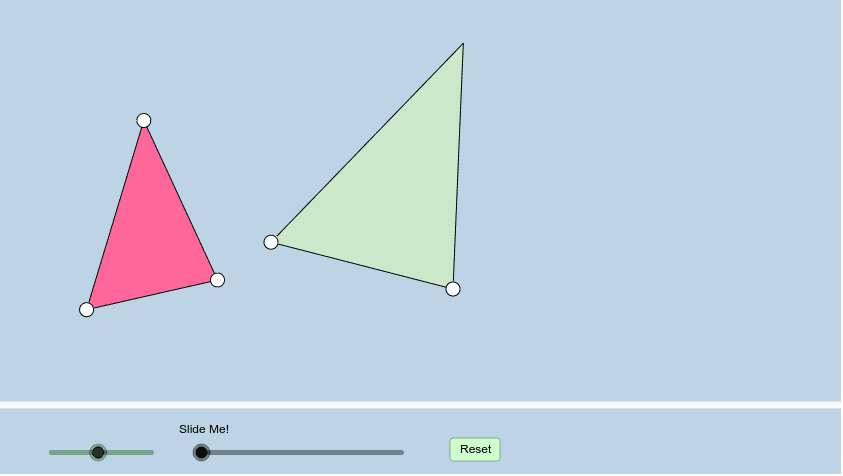
This example demonstrates how to understand the concept of similarity between two triangles through dynamic transformations. Key mathematical concepts include similar triangles, scaling transformations, and geometric transformations. Construction involves using GeoGebra commands such as Segment, Rotate, Dilate, and Translate to create interactive graphics. Suitable for middle or high school mathematics teaching to help students intuitively understand the principle of similarity.
GeoGebra Commands & Parameters
Segment(A, B) → aSegment(B, C) → bSegment(C, A) → cCircle(D, (k * a)) → dPoint(d) → ESegment(D, E) → eCircle(E, (k * b)) → fAngle(A, B, C) → αRotate(D, α, E) → D'Angle(D, E, D') → βRay(E, D') → gIntersect(f, g, 1) → FAngle(C, A, B) → γRotate(E, (-γ), D) → E'Angle(E', D, E) → δRay(D, E') → hSegment(D, E') → iSegment(E', E) → jLine(E, D') → lLine(E, D') → nCircle(D, (k * c)) → pRay(D, E') → mIntersect(p, m, 1) → GSegment(E, G) → qSegment(D, G) → rDilate(D, If[0 < s ≤ 1, 1 - s], A) → D'_1Vector(D, D'_1) → uPolygon(A, C, B) → poly1, b_1, a_1, c_1Polygon(D, E, G) → poly2, g_1, d_1, e_1Translate(D, u) → D'_2Translate(E, u) → E'_1Translate(G, u) → G'Polygon(D'_2, E'_1, G') → poly2', g', d'_2, e'_1Vector(D, A) → vTranslate(D, v) → D'_3Translate(E, v) → E'_2Translate(G, v) → G'_1Polygon(D'_3, E'_2, G'_1) → poly2'_1, g'_1, d'_3, e'_2Segment(D'_1, G') → tSegment(E'_1, D'_1) → h_1Segment(A, G'_1) → i_1Segment(G'_1, E'_2) → j_1Segment(E'_2, A) → k_1Angle(C, A, E'_2) → εIf(ε > γ, ε - γ, γ - ε) → ζRotate(D'_3, If[1 < s ≤ 2, ((-(s - 1)) * ζ), (-ζ)], A) → HRotate(E'_2, If[1 < s ≤ 2, ((-(s - 1)) * ζ), (-ζ)], A) → IRotate(G'_1, If[1 < s ≤ 2, ((-(s - 1)) * ζ), (-ζ)], A) → JPolygon(H, I, J) → poly3, j_2, h_2, i_2Segment(A, J) → l_1Segment(A, I) → m_1Segment(I, J) → n_1Dilate(J, If[2 < s ≤ 3, 3 - s, 0], C) → J'Dilate(I, If[2 < s ≤ 3, 3 - s, 0], B) → I'Segment(I', J') → p_1Angle(A, I, J) → θAngle(D'_2, E'_1, G') → ιAngle(J, A, I) → λAngle(G', D'_1, E'_1) → μPolygon(A, J', I') → poly4, i', a_2, j'Segment(G'_1, E'_2) → q_1Segment(G', E'_1) → f_1Rotate(D'_3, ((s - 1) * ζ), A) → KRotate(D'_3, If[1 < s ≤ 2, ((s - 1) * ζ), ζ], A) → LRotate(E'_2, If[1 < s ≤ 2, ((s - 1) * ζ), ζ], A) → MRotate(G'_1, If[1 < s ≤ 2, ((s - 1) * ζ), ζ], A) → NPolygon(L, M, N) → poly5, n_2, l_2, m_2Dilate(M, If[2 < s ≤ 3, 3 - s, 0], B) → M'Dilate(N, If[2 < s ≤ 3, 3 - s, 0], C) → N'Segment(M', N') → r_1Polygon(A, M', N') → poly6, n', a_3, m'Angle(A, M', N') → οAngle(A, M, N) → ρSegment(A, M) → t_1Segment(M, N) → b_2Segment(A, N) → c_2Angle(B, A, C) → σAngle(G, E, D) → τAngle(N, M, A) → υAngle(N', M', A) → ϕLine(E, G) → s_1Mirror(D, q) → D'_4Mirror(E, q) → E'_3Mirror(G, q) → G'_2Polygon(D'_4, E'_3, G'_2) → poly2'_2, g'_2, d'_4, e'_3Segment(E, D'_4) → f_2Segment(D'_4, G) → g_2
AI Drawing Prompt Reference
Draw two similar triangles, one obtained from the other by rotation, scaling, and translation. Start with an arbitrary triangle. Then, using a point as center, draw circles with radii proportional to the side lengths, pick points on these circles to form a second triangle with corresponding angles equal. Then translate and rotate this second triangle to different positions, showing that similarity is preserved. Connect corresponding vertices with dashed lines and label angles to illustrate the transformation.
The prompt above was compiled from the original drawing commands and is for reference only.