
Dynamic Construction and Volume Calculation of a Cylinder
Loading the math board and drawing, please wait…
In collections
Prep mathematics
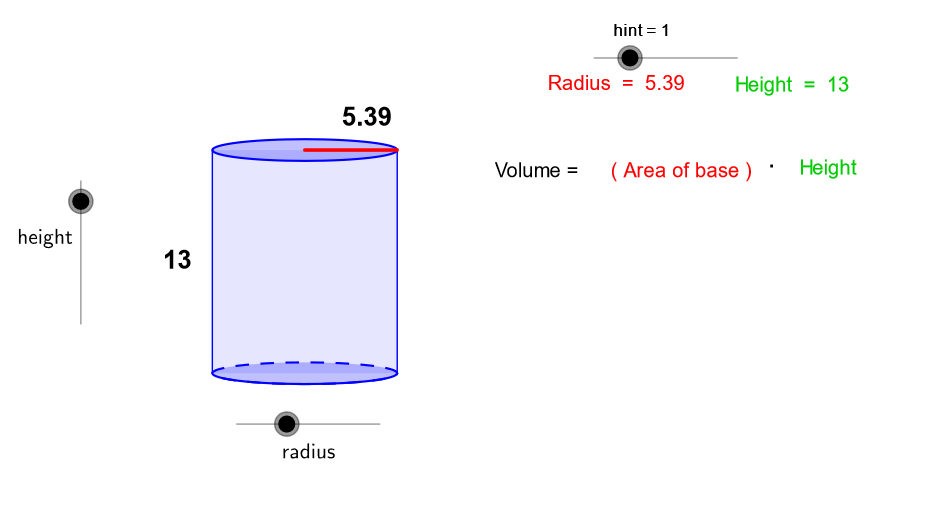
This GeoGebra example demonstrates the dynamic construction of a cylinder and real-time calculation of its volume. Core mathematical concepts include solid geometry (cylinder definition), the volume formula V=πr²h, and the combination of basic geometric elements such as vectors, segments, arcs, and polygons. Construction highlights: the Intersect command finds intersection points, Vector and Translate define and apply translation vectors, Segment and Arc draw the base circle and lateral edges, Polygon constructs the base face, Root and Midpoint assist in positioning, and the volume object computes the volume while ShowText objects display results. Suitable for middle and high school solid geometry lessons, it helps students intuitively understand how a cylinder is generated and how its volume formula works, and allows exploration of how changing radius or height affects the volume.
GeoGebra Commands & Parameters
Intersect(c, xAxis, 1) → AIntersect(c, xAxis, 2) → BVector((-17, 0), ((-1 * 17), b)) → uTranslate(c, u) → dTranslate(A, u) → CTranslate(B, u) → DSegment(A, C) → eSegment(B, D) → fArc(c, A, B) → gPolygon(C, D, B, A) → P, c_1, d_1, b_1, a_1Intersect(xAxis, yAxis) → ESegment(E, B) → hTranslate(E, u) → E'Translate(B, u) → B'Segment(E', B') → iRoot(32) → FMidpoint(i) → GMidpoint(e) → H
AI Drawing Prompt Reference
Draw a cylinder to dynamically show its generation process and volume calculation. Start by drawing the x and y axes, then create a circle on the x-axis. Use vectors and translation to move the circle along the y-axis, forming the top and bottom bases of the cylinder. Connect the corresponding points of the top and bottom bases to create the lateral surface. Calculate and display the volume of the cylinder, and use sliders to adjust the radius and height to observe how the volume changes.
The prompt above was compiled from the original drawing commands and is for reference only.