
Unit Squares Multipurpose Template for Area and Perimeter Visualization
Loading the math board and drawing, please wait…
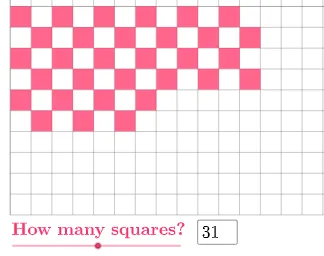
This example demonstrates a unit-square based construction template that organizes shapes on a grid so learners can visualize and compute geometric measures such as area and perimeter. It highlights key ideas from rectangle and square geometry, including how regions formed by assembling unit cells can be analyzed consistently. It also supports exploring related configurations such as isosceles triangles and the centroid/barycenter concept when composite shapes are interpreted as combinations of geometric parts. Construction-wise, the GeoGebra build uses Polygon to create a set of many polygon objects (poly1, poly1_1 through poly1_39) and Textfield to display labels/parameter text on the diagram. The template is well suited for middle and high school geometry lessons, investigative activities, and teacher demonstrations focused on quantitative visual reasoning.
GeoGebra Commands & Parameters
Polygon((0, 7), (1, 7), 4) → poly1Polygon((9, 8), (10, 8), 4) → poly1_{1}Polygon((4, 9), (5, 9), 4) → poly1_{2}Polygon((8, 9), (9, 9), 4) → poly1_{3}Polygon((10, 9), (11, 9), 4) → poly1_{4}Polygon((3, 8), (4, 8), 4) → poly1_{5}Polygon((6, 9), (7, 9), 4) → poly1_{6}Polygon((5, 8), (6, 8), 4) → poly1_{7}Polygon((1, 8), (2, 8), 4) → poly1_{8}Polygon((1, 6), (2, 6), 4) → poly1_{9}Polygon((7, 8), (8, 8), 4) → poly1_{10}Polygon((11, 8), (12, 8), 4) → poly1_{11}Polygon((0, 9), (1, 9), 4) → poly1_{12}Polygon((2, 7), (3, 7), 4) → poly1_{13}Polygon((2, 9), (3, 9), 4) → poly1_{14}Polygon((4, 7), (5, 7), 4) → poly1_{15}Polygon((3, 6), (4, 6), 4) → poly1_{16}Polygon((6, 7), (7, 7), 4) → poly1_{17}Polygon((5, 6), (6, 6), 4) → poly1_{18}Polygon((8, 7), (9, 7), 4) → poly1_{19}Polygon((7, 6), (8, 6), 4) → poly1_{20}Polygon((10, 7), (11, 7), 4) → poly1_{21}Polygon((9, 6), (10, 6), 4) → poly1_{22}Polygon((0, 5), (1, 5), 4) → poly1_{23}Polygon((11, 6), (12, 6), 4) → poly1_{24}Polygon((2, 5), (3, 5), 4) → poly1_{25}Polygon((1, 4), (2, 4), 4) → poly1_{26}Polygon((4, 5), (5, 5), 4) → poly1_{27}Polygon((3, 4), (4, 4), 4) → poly1_{28}Polygon((6, 5), (7, 5), 4) → poly1_{29}Polygon((5, 4), (6, 4), 4) → poly1_{30}Polygon((8, 5), (9, 5), 4) → poly1_{31}Polygon((7, 4), (8, 4), 4) → poly1_{32}Polygon((10, 5), (11, 5), 4) → poly1_{33}Polygon((9, 4), (10, 4), 4) → poly1_{34}Polygon((0, 3), (1, 3), 4) → poly1_{35}Polygon((11, 4), (12, 4), 4) → poly1_{36}Polygon((2, 3), (3, 3), 4) → poly1_{37}Polygon((1, 2), (2, 2), 4) → poly1_{38}Polygon((4, 3), (5, 3), 4) → poly1_{39}Polygon((3, 2), (4, 2), 4) → poly1_{40}Polygon((6, 3), (7, 3), 4) → poly1_{41}Polygon((5, 2), (6, 2), 4) → poly1_{42}Polygon((8, 3), (9, 3), 4) → poly1_{43}Polygon((7, 2), (8, 2), 4) → poly1_{44}Polygon((10, 3), (11, 3), 4) → poly1_{45}Polygon((9, 2), (10, 2), 4) → poly1_{46}Polygon((0, 1), (1, 1), 4) → poly1_{47}Polygon((11, 2), (12, 2), 4) → poly1_{48}Polygon((2, 1), (3, 1), 4) → poly1_{49}Polygon((1, 0), (2, 0), 4) → poly1_{50}Polygon((4, 1), (5, 1), 4) → poly1_{51}Polygon((3, 0), (4, 0), 4) → poly1_{52}Polygon((6, 1), (7, 1), 4) → poly1_{53}Polygon((5, 0), (6, 0), 4) → poly1_{54}Polygon((8, 1), (9, 1), 4) → poly1_{55}Polygon((7, 0), (8, 0), 4) → poly1_{56}Polygon((10, 1), (11, 1), 4) → poly1_{57}Polygon((9, 0), (10, 0), 4) → poly1_{58}Polygon((11, 0), (12, 0), 4) → poly1_{60}Textfield(a) → InputBox1
AI Drawing Prompt Reference
Draw multiple unit squares on a grid, each with side length 1, starting from the top-left corner. The first row has 7 squares, the second row has 8, the third row has 9, and so on, until the tenth row which has 7 squares. Leave gaps between each square to form a neat array. Use different colors or fill effects to distinguish each square for visualizing and calculating area and perimeter.
The prompt above was compiled from the original drawing commands and is for reference only.