
Dynamic Triangle with Circumcircle, Incircle and Angle Exploration
Loading the math board and drawing, please wait…
In collections
Prep mathematics
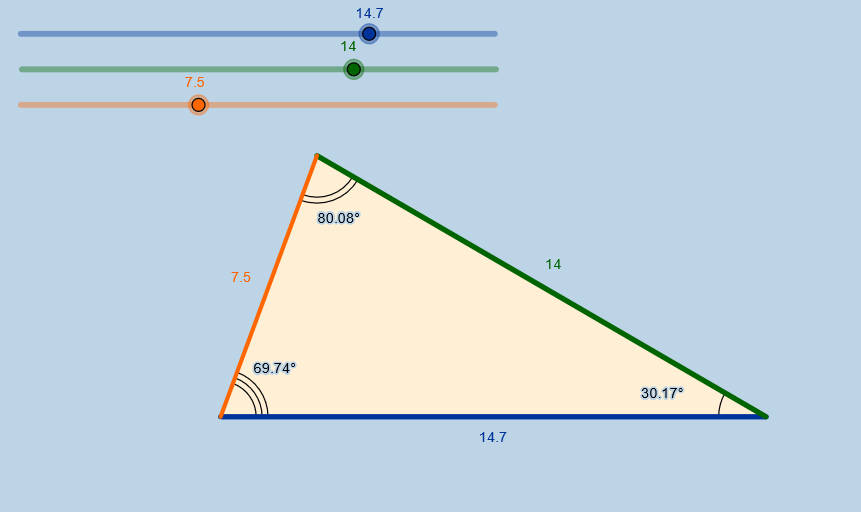
This GeoGebra example demonstrates a triangle with its circumcircle and incircle, along with dynamic angle labels, allowing users to adjust side lengths or angles via input boxes and observe how the triangle and circles change in real time. Core mathematical concepts include triangle properties, circumcenter and incenter, relationships between central and inscribed angles, and the interdependence of sides and angles. Construction uses GeoGebra commands: Circle for the circumcircle and incircle, Intersect to find intersection points, Segment and Polygon to build the triangle, Angle to label α, β, γ, and Textfield/InputBox for interactive input. Objects include points A, B, C, segments a, b, c, circles d, e, polygon poly1, and more. Suitable for middle and high school students learning plane geometry, circle-triangle relationships, and dynamic math exploration in classroom demonstrations or self-study.
GeoGebra Commands & Parameters
Circle(A, a) → dIntersect(d, e) → B, CCircle(C, b) → fSegment(A, C) → gCircle(A, c) → kIntersect(k, f) → F, G, ,Segment(C, F) → hSegment(F, A) → iPolygon(A, C, F) → poly1, f_1, a_1, c_1Textfield(a) → InputBox1Textfield(b) → InputBox2Textfield(c) → InputBox3Angle(A, F, C) → αAngle(F, C, A) → βAngle(C, A, F) → γ
AI Drawing Prompt Reference
Create a dynamic geometry diagram showing a triangle together with a circumcircle and an incircle, focused on angle exploration. Use three adjustable parameters for side-related lengths, then place the triangle’s vertices by constructing circles and taking their intersection points. Build the triangle edges by connecting the appropriate vertices, define a polygonal region using the main three vertices and an additional constructed point, and display three angle labels α, β, and γ at the corresponding vertex–ray configurations. Add input boxes tied to the three parameters so that changing them updates the triangle, the circles, and the angle labels in real time.
The prompt above was compiled from the original drawing commands and is for reference only.