
Dissecting a Square into Four Equal Parts
Loading the math board and drawing, please wait…
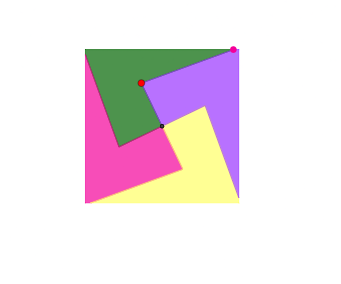
This example demonstrates how to dissect a square into four equal parts. It involves core mathematical concepts such as rotation, polygons, and geometric transformations. Key GeoGebra commands used include Polygon, Intersect, Rotate, Point, and PointIn. Suitable for middle school and above students to learn geometric constructions and transformations.
GeoGebra Commands & Parameters
Polygon(A, B, 4) → poly1, f, g, h, i, C, DIntersect(xAxis, yAxis) → ERotate(D, 90°, E) → D'Rotate(E, 90°, E) → E'Rotate(D', 90°, E) → D''Rotate(E', 90°, E) → E''Rotate(D'', 90°, E) → D'''Rotate(E'', 90°, E) → E'''Point(xAxis) → FPoint(xAxis) → GPolygon(D, F, G, C) → q1, d, f_1, g_1, cPoint(c) → IPointIn(q1) → HRotate(I, 90°, E) → I'Rotate(E, 90°, E) → E'_{1}Rotate(I, 90°, E) → I'_{1}Rotate(D, 90°, E) → D'_{1}Rotate(H, 90°, E) → H'Polygon(E, H, I, D, I', H') → poly2, e, h_1, i_1, d_1, i', h'Rotate(E, 90°, E) → E'_{2}Rotate(H, 90°, E) → H'_{1}Rotate(I, 90°, E) → I'_{2}Rotate(D, 90°, E) → D'_{2}Rotate(I', 90°, E) → I''Rotate(H', 90°, E) → H''Polygon(E'_{2}, H'_{1}, I'_{2}, D'_{2}, I'', H'') → poly2', e'_{2}, h'_{1}, i'_{2}, d'_{2}, i'', h''Rotate(E'_{2}, 90°, E) → JRotate(H'_{1}, 90°, E) → KRotate(I'_{2}, 90°, E) → LRotate(D'_{2}, 90°, E) → MRotate(I'', 90°, E) → I'''Rotate(H'', 90°, E) → H'''Polygon(J, K, L, M, I''', H''') → poly2'', j, k, l, m, i''', h'''Rotate(J, 90°, E) → J'Rotate(K, 90°, E) → K'Rotate(L, 90°, E) → L'Rotate(M, 90°, E) → M'Rotate(I''', 90°, E) → NRotate(H''', 90°, E) → OPolygon(J', K', L', M', N, O) → poly2''', j', k', l', m', n, o
AI Drawing Prompt Reference
Draw a square, then rotate it 90 degrees four times to generate a new square each time, resulting in four equal parts. First, draw a square, then take two points on the x-axis as new vertices, draw a new square, and rotate one of its vertices 90 degrees four times, generating a new vertex each time, and finally use these vertices to draw four equal parts.
The prompt above was compiled from the original drawing commands and is for reference only.