
Designing an Open Box from a Rectangular Cardboard
Loading the math board and drawing, please wait…
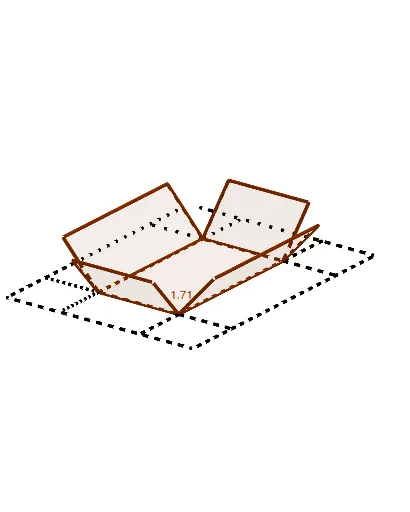
① This applet demonstrates how to create a three-dimensional open box by cutting squares from the corners of a rectangular piece of cardboard and folding up the sides, with dynamic visualization of how the box's volume changes with the cut size. ② Core mathematical concepts include geometric transformations (rotation, translation), polygon construction, volume calculation, and optimization—finding the cut length that maximizes the box's volume. ③ Construction highlights: using GeoGebra commands such as Intersect, Point, Segment, Polygon, and Rotate, the applet defines rectangle vertices A, B, C, D, determines cut positions via intersection points E, F, G, H, and uses segments and rotations to form the folded side faces, resulting in a 3D open box; key objects include points, segments, polygons, and rotated figures. ④ Suitable for high school or early college students to explore solid geometry, function modeling, and optimization, and serves as a visual aid for calculus derivative-based extremum problems.
GeoGebra Commands & Parameters
Intersect(xAxis, yAxis) → APoint(xAxis) → BPoint(yAxis) → CPoint(yAxis) → ESegment(E, F) → gPoint(g) → GSegment(E, G) → hSegment(C, A) → fSegment(A, B) → iSegment(B, P) → jSegment(P, C) → kPolygon(J, L, R, S) → q1, j_1, l, r, sPolygon(K, L, D, I) → q2, k_1, l_1, d, i_1Polygon(D, N, O, H) → q3, d_1, n, o, h_1Polygon(R, Q, M, N) → q4, r_1, q, m, n_1Polygon(L, D, N, R) → q5, l_2, d_2, n_2, r_2Rotate(K, (-α), l_2) → K'Rotate(L, (-α), l_2) → L'Rotate(D, (-α), l_2) → D'Rotate(I, (-α), l_2) → I'Polygon(K', L', D', I') → q2', k', l', d', i'Rotate(J, (-α), r_2) → J'Rotate(L, (-α), r_2) → L'_1Rotate(R, (-α), r_2) → R'Rotate(S, (-α), r_2) → S'Polygon(J', L'_1, R', S') → q1', j', l'_1, r', s'Rotate(R, (-α), n_2) → R'_1Rotate(Q, (-α), n_2) → Q'Rotate(M, (-α), n_2) → M'Rotate(N, (-α), n_2) → N'Polygon(R'_1, Q', M', N') → q4', r'_1, q', m', n'Rotate(D, (-α), d_2) → D'_1Rotate(N, (-α), d_2) → N'_1Rotate(O, (-α), d_2) → O'Rotate(H, (-α), d_2) → H'Polygon(D'_1, N'_1, O', H') → q3', d'_1, n'_1, o', h'Segment(I, D'_1) → pSegment(D'_1, H) → tSegment(N'_1, O) → aSegment(N'_1, M) → bSegment(R', S) → cSegment(R', Q) → eSegment(J, L'_1) → f_1Segment(L'_1, K) → g_1Segment(E, F) → m_1
AI Drawing Prompt Reference
Draw a 3D open box formed by cutting squares from the corners of a rectangular cardboard and folding up the sides. Start with a flat rectangle, mark cut points on each edge to define four corner squares. Then rotate each side face upward around the base edges by a variable angle to create the box. Show how the box volume changes with the cut size, and indicate the cut length that maximizes volume. Include the base, four folded side faces, cut lines, and a volume curve.
The prompt above was compiled from the original drawing commands and is for reference only.