
Cuboctahedron
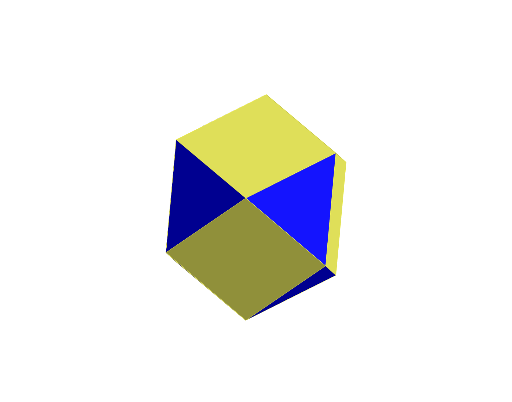
Loading the math board and drawing, please wait…
In collections
Archimedean Solids
This example demonstrates the geometric construction and properties of a cuboctahedron. Key math concepts include solid geometry, polygons, and symmetry. The construction uses GeoGebra commands and objects such as Point, Cube, Sphere, Intersect, Rotate, Midpoint, and Polygon, as outlined in the summary. Suitable for high school students and math enthusiasts studying 3D shapes.
GeoGebra Commands & Parameters
Point(Circle[B, Distance[A, B], Segment[A, B]]) → CCube(A, B, C) → a, D, faceCDHG, faceEFGH, edgeAD, edgeAB, edgeBC, edgeCD, edgeAE, edgeDH, edgeEH, edgeEF, E, edgeBF, edgeFG, edgeCG, edgeGH, F, G, H, faceABCD, faceADHE, faceABFE, faceBCGFSphere(A, 3) → bIntersect(edgeAE, xOyPlane) → IIntersect(edgeAD, xOyPlane) → JIntersect(edgeAD, b, 1) → KIntersect(edgeAB, b, 1) → LRotate(I, 90°, zAxis) → I'Rotate(I, 180°, zAxis) → I'_{1}Rotate(I, 270°, zAxis) → I'_{2}Rotate(L, 90°, xAxis) → L'Rotate(L, 180°, xAxis) → L'_{1}Rotate(L, 270°, xAxis) → L'_{2}Rotate(K, 90°, yAxis) → K'Rotate(K, 180°, yAxis) → K'_{1}Midpoint(H, E) → MPolygon(M, I, L') → t1, l', m, iRotate(t1, 90°, zAxis) → t1'Rotate(t1, 180°, zAxis) → t1'_{1}Rotate(t1, 270°, zAxis) → t1'_{2}Rotate(t1, -90°, xAxis) → t1'_{3}Rotate(t1'_{3}, 90°, zAxis) → t2Rotate(t1'_{3}, 180°, zAxis) → t3Rotate(t1'_{3}, 270°, zAxis) → t4Polygon(M, I'_{2}, K, I) → q1, m_1, i'_{2}, k, i_1Rotate(q1, 90°, zAxis) → q1'Rotate(q1, 180°, zAxis) → q1'_{1}Rotate(q1, 270°, zAxis) → q1'_{2}Rotate(q1, 90°, yAxis) → q1'_{3}Rotate(q1, -90°, yAxis) → q1'_{4}
AI Drawing Prompt Reference
Construct a cuboctahedron in 3D using a cube as the starting solid. First define a reference circle and create initial points, then build a cube from the key points to obtain its vertices, edges, and face structure. Draw a sphere centered at one chosen cube vertex, and find intersection points between the sphere and selected cube edges with the relevant coordinate plane. Rotate these intersection points around the z-axis and x-/y-axes by right angles to generate their symmetric counterparts. Use the midpoint between two rotated vertices and connect suitable sets of points to form triangular and polygonal faces. Continue rotating and assembling the additional symmetric polygons so the whole figure shows the cuboctahedron’s complete multi-face shape.
The prompt above was compiled from the original drawing commands and is for reference only.