
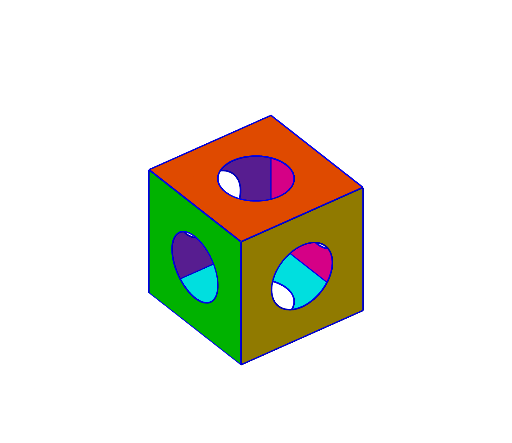
Cube with Six Holes
Loading the math board and drawing, please wait…
This example demonstrates the geometric construction of a cube with six holes, involving concepts like geometric transformations, vectors, and coordinate geometry. The construction uses GeoGebra commands such as CurveCartesian, Surface, Midpoint, and operations like rotation and mirroring. It is suitable for middle or high school mathematics education to understand solid geometry and spatial transformations.
GeoGebra Commands & Parameters
CurveCartesian(cos(t), 2, sin(t), t, 0, (2 * pi)) → aCurveCartesian((2 * cos(t)), 2, (2 * sin(t)), t, 0, (2 * pi)) → bSurface(((1 - u) * a(t)) + (u * b(t)), u, 0, 1, t, 0, (4 * pi)) → cCurveCartesian(cos(t), -2, sin(t), t, 0, (2 * pi)) → dCurveCartesian((2 * cos(t)), -2, (2 * sin(t)), t, 0, (2 * pi)) → eSurface(((1 - u) * d(t)) + (u * e(t)), u, 0, 1, t, 0, (4 * pi)) → fCurveCartesian(cos(t), sin(t), 2, t, 0, (2 * pi)) → gCurveCartesian((2 * cos(t)), (2 * sin(t)), 2, t, 0, (2 * pi)) → hSurface(((1 - u) * g(t)) + (u * h(t)), u, 0, 1, t, 0, (4 * pi)) → iCurveCartesian(cos(t), sin(t), -2, t, 0, (2 * pi)) → jCurveCartesian((2 * cos(t)), (2 * sin(t)), -2, t, 0, (2 * pi)) → kSurface(((1 - u) * j(t)) + (u * k(t)), u, 0, 1, t, 0, (4 * pi)) → lCurveCartesian(2, cos(t), sin(t), t, 0, (2 * pi)) → mCurveCartesian(2, (2 * cos(t)), (2 * sin(t)), t, 0, (2 * pi)) → nSurface(((1 - u) * m(t)) + (u * n(t)), u, 0, 1, t, 0, (4 * pi)) → oCurveCartesian(-2, cos(t), sin(t), t, 0, (2 * pi)) → pCurveCartesian(-2, (2 * cos(t)), (2 * sin(t)), t, 0, (2 * pi)) → qSurface(((1 - u) * p(t)) + (u * q(t)), u, 0, 1, t, 0, (4 * pi)) → rMidpoint(A, C) → IMidpoint(A, B) → JPolygon(A, I, J) → t1, j_1, a_1, i_1Rotate(t1, 90°, zAxis) → t1'Rotate(t1, 180°, zAxis) → t1'_{1}Rotate(t1, 270°, zAxis) → t1'_{2}Rotate(t1, -90°, xAxis) → t1'_{3}Rotate(t1'_{3}, 90°, yAxis) → t2Rotate(t2, 90°, yAxis) → t2'Rotate(t2, 180°, yAxis) → t2'_{1}Rotate(t2, 90°, zAxis) → t2'_{2}Rotate(t2'_{2}, -90°, xAxis) → t3Rotate(t2'_{2}, -180°, xAxis) → t4Rotate(t2'_{2}, -270°, xAxis) → t5Mirror(t4, eq1) → t4'Mirror(t3, eq1) → t3'Mirror(t2'_{2}, eq1) → t6Mirror(t5, eq1) → t5'Mirror(t2'_{1}, s) → t7Mirror(t2', s) → t2''Mirror(t2, s) → t2'_{3}Mirror(t1'_{3}, s) → t8Mirror(t1'_{1}, t) → t9Mirror(t1'_{2}, t) → t10Mirror(t1, t) → t1'_{4}Mirror(t1', t) → t1''Segment(D, B) → f_1Segment(B, A) → g_1Segment(A, C) → h_1Segment(C, D) → k_1Segment(B, F) → l_1Segment(D, H) → m_1Segment(H, F) → n_1Segment(F, E) → p_1Segment(E, A) → q_1Segment(E, G) → r_1Segment(G, C) → s_1Segment(G, H) → t_1CurveCartesian(cos(t), 2, sin(t), t, 0, (2 * pi)) → u
AI Drawing Prompt Reference
Draw a cube with six holes. Start by drawing a cube, then create a hole on each of its six faces. Each hole consists of a circle and a cylindrical surface, with the circle centered on the face and the cylinder perpendicular to the face. Finally, use rotation and mirroring to duplicate the hole on all six faces.
The prompt above was compiled from the original drawing commands and is for reference only.