
Cube Cross-Sections
Loading the math board and drawing, please wait…
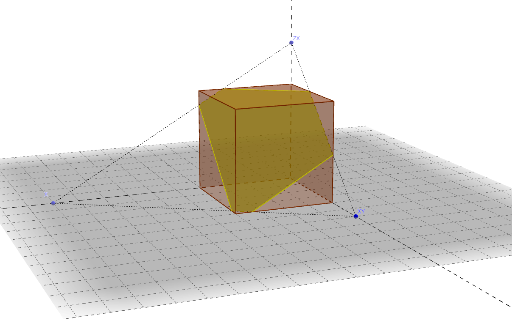
This example demonstrates the variety of cross-section shapes obtained by rotating a cube, exploring concepts like rotation, intersection, statistics, and curve sketching. It uses commands such as Polygon, Prism, Line, Ray, Point, Segment, Plane, PointIn, and IntersectPath to construct the geometry and observe the sections. Ideal for high school solid geometry and introductory mathematical modeling.
GeoGebra Commands & Parameters
Polygon(A, B, 4) → poly1, a, b, c, d, C, DPrism(poly1, a) → e, E, edgeAE, edgeBF, edgeCG, edgeDH, edgeEF, edgeFG, edgeGH, edgeEH, F, G, H, faceABFE, faceBCGF, faceCDHG, faceADHE, faceEFGHLine(C, G) → gRay(C, B) → qRay(C, D) → rRay(C, G) → sPoint(r) → XSegment(X, XY) → nPlane(faceCDHG) → oPointIn(o) → ZXSegment(ZX, X) → fSegment(ZX, XY) → hPlane(ZX, X, XY) → iIntersectPath(i, e) → poly2, J, m, p, t, K, L, M, N, O, j, k, l