
Cube and Octahedron to Cuboctahedron Transformation
Loading the math board and drawing, please wait…
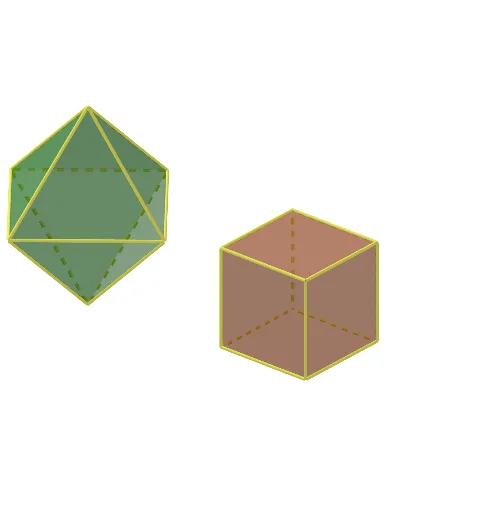
This GeoGebra applet demonstrates the geometric transformation of a cube and a regular octahedron into a cuboctahedron, a uniform polyhedron. Core mathematical concepts include polyhedron rectification, symmetry, and geometric construction. The construction utilizes GeoGebra commands such as Point, Segment, Polygon, Prism, Pyramid, Sphere, Intersect, Midpoint, Line, and Rotate, manipulating vertices, edges, and faces to illustrate the transformation process. It is suitable for high school and beyond, particularly in solid geometry, symmetry units, or interactive math modeling.
GeoGebra Commands & Parameters
Point(Circle[A, (2 * sqrt(2))]) → BSegment(A, B) → fPolygon(A, B, 4) → poly1, g, h, i, j, C, DPolygon(E, F, 4, xOyPlane) → poly2, k, l, m, n, G, HPrism(poly2, b) → c, M, edgeEM, edgeFN, edgeGO, edgeHP, edgeMN, edgeNO, edgeOP, edgeMP, N, O, P, faceEFNM, faceFGON, faceGHPO, faceEHPM, faceMNOPPolygon(A, B, 4) → poly3, p, q, r, s, I, JPyramid(poly3, e) → o, L, faceABL, faceBIL, faceIJL, faceAJL, edgeAL, edgeBL, edgeIL, edgeJLPyramid(poly3, t) → u, Q, faceABQ, faceBIQ, faceIJQ, faceAJQ, edgeAQ, edgeBQ, edgeIQ, edgeJQSphere(M, a) → vIntersect(edgeGO, v) → K,Intersect(edgeMN, v, 1) → RIntersect(edgeEM, v, 1) → SIntersect(edgeMP, v, 1) → TPolygon(T, S, R) → t1, r_1, t_1, s_1Midpoint(M, O) → UMidpoint(E, G) → VLine(U, V) → f_1Rotate(t1, (-(90°)), f_1) → t1'Rotate(R, (-(90°)), f_1) → R'Rotate(T, (-(90°)), f_1) → T'Rotate(S, (-(90°)), f_1) → S'Rotate(t1, (-(180°)), f_1) → t1'_1Rotate(R, (-(180°)), f_1) → R'_1Rotate(T, (-(180°)), f_1) → T'_1Rotate(S, (-(180°)), f_1) → S'_1Rotate(t1, (-(270°)), f_1) → t1'_2Rotate(R, (-(270°)), f_1) → R'_2Rotate(T, (-(270°)), f_1) → T'_2Rotate(S, (-(270°)), f_1) → S'_2Segment(H, E) → g_1Segment(E, F) → h_1Segment(F, G) → i_1Segment(H, G) → j_1Sphere(E, a) → wIntersect(h_1, w, 1) → WIntersect(edgeEM, w, 1) → ZIntersect(g_1, w, 1) → A_1Polygon(Z, A_1, W) → t2, w_1, z_1, a_1Rotate(t2, (-(90°)), f_1) → t2'Rotate(Z, (-(90°)), f_1) → Z'Rotate(W, (-(90°)), f_1) → W'Rotate(A_1, (-(90°)), f_1) → B_1Rotate(t2, (-(180°)), f_1) → t2'_1Rotate(W, (-(180°)), f_1) → W'_1Rotate(A_1, (-(180°)), f_1) → C_1Rotate(Z, (-(180°)), f_1) → Z'_1Rotate(t2, (-(270°)), f_1) → t2'_2Rotate(Z, (-(270°)), f_1) → Z'_2Rotate(A_1, (-(270°)), f_1) → D_1Rotate(W, (-(270°)), f_1) → W'_2Sphere(L, ((a * 2) * sqrt(2) / 2)) → b_1Intersect(edgeIL, b_1, 1) → E_1Intersect(edgeBL, b_1, 1) → F_1Intersect(edgeJL, b_1, 1) → G_1Intersect(edgeAL, b_1, 1) → H_1Polygon(H_1, F_1, E_1, G_1) → q1, k_1, l_1, e_1, m_1Sphere(A, (a * sqrt(2))) → c_1Intersect(edgeAL, c_1, 1) → I_1Intersect(p, c_1, 1) → J_1Intersect(s, c_1, 1) → K_1Intersect(edgeAQ, c_1, 1) → L_1Polygon(K_1, L_1, J_1, I_1) → q2, n_1, p_1, q_1, d_1Line(L, Q) → f_2Rotate(q2, (-(90°)), f_2) → q2'Rotate(K_1, (-(90°)), f_2) → M_1Rotate(I_1, (-(90°)), f_2) → N_1Rotate(J_1, (-(90°)), f_2) → O_1Rotate(L_1, (-(90°)), f_2) → P_1Rotate(q2, (-(180°)), f_2) → q2'_1Rotate(K_1, (-(180°)), f_2) → Q_1Rotate(I_1, (-(180°)), f_2) → R_1Rotate(J_1, (-(180°)), f_2) → S_1Rotate(L_1, (-(180°)), f_2) → T_1Rotate(q2, (-(270°)), f_2) → q2'_2Rotate(J_1, (-(270°)), f_2) → U_1Rotate(K_1, (-(270°)), f_2) → V_1Rotate(L_1, (-(270°)), f_2) → W_1Rotate(I_1, (-(270°)), f_2) → Z_1Line(J, B) → g_2Rotate(q1, 180°, g_2) → q1'Rotate(F_1, 180°, g_2) → A_2Rotate(E_1, 180°, g_2) → B_2Rotate(H_1, 180°, g_2) → C_2Rotate(G_1, 180°, g_2) → D_2Polygon(R_1, S_1, V_1, Z_1, G_1, E_1) → poly4, s_2, t_2, v_1, a_2, b_2, c_2Polygon(Z_1, U_1, K_1, I_1, H_1, G_1) → poly5, h_2, u_1, i_2, j_2, d_2, e_2Polygon(H_1, I_1, J_1, M_1, N_1, F_1) → poly6, k_2, l_2, m_2, n_2, f_3, g_3Polygon(O_1, P_1, A_2, C_2, T_1, Q_1) → poly7, h_3, i_3, j_3, k_3, l_3, m_3Polygon(S_1, T_1, C_2, D_2, W_1, V_1) → poly8, n_3, p_3, q_3, r_3, s_3, t_3Polygon(U_1, W_1, D_2, B_2, L_1, K_1) → poly9, a_3, b_3, c_3, d_3, e_3, f_4Polygon(R', T'_1, R'_1, T'_2, R'_2, T, R, T') → poly10, r', t'_1, r'_1, t'_2, r'_2, t_4, r_4, t'Polygon(R, S, Z, W, B_1, Z', S', T') → poly11, r_5, s_4, z_2, w_2, g_4, z', s', h_4Polygon(R', S', Z', W', C_1, Z'_1, S'_1, T'_1) → poly12, i_4, j_4, k_4, w', l_4, z'_1, s'_1, m_4Polygon(R'_1, S'_1, Z'_1, W'_1, D_1, Z'_2, S'_2, T'_2) → poly13, n_4, p_4, q_4, w'_1, a_4, z'_2, s'_2, b_4Polygon(R'_2, S'_2, Z'_2, W'_2, A_1, Z, S, T) → poly14, c_4, d_4, e_4, w'_2, f_5, z_3, s_5, t_5Polygon(A_1, W'_2, D_1, W'_1, C_1, W', B_1, W) → poly15, g_5, h_5, i_5, j_5, k_5, l_5, m_5, w_3Polygon(E_1, R_1, Q_1, O_1, N_1, F_1) → poly16, p_2, q_2, r_2, o_1, n_5, p_5Polygon(I_1, K_1, L_1, J_1) → q3, q_5, a_5, b_5, c_5Polygon(A_2, B_2, D_2, C_2) → q4, d_5, e_5, f_6, g_6Polygon(M_1, B_2, A_2) → t3, h_6, i_6, j_6
AI Drawing Prompt Reference
Draw a cube and a regular octahedron, showing how they transform into a cuboctahedron. Start by sketching the vertices and edges of the cube and the octahedron. Then, extend the octahedron vertically from its center to form an octagonal prism. Next, extend the faces of the cube and truncate its corners to create the initial shape of the cuboctahedron. Finally, add spheres at the vertices of the octagonal prism and the truncated cube to give the polyhedron a more rounded appearance.
The prompt above was compiled from the original drawing commands and is for reference only.