
Constructing the Cardioid via Intersection Locus
Loading the math board and drawing, please wait…
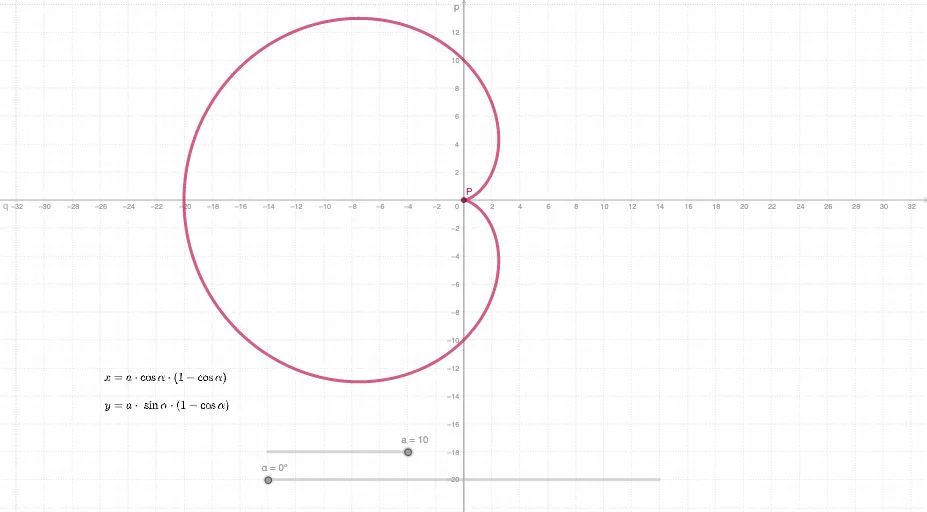
This example demonstrates how to generate the classic cardioid curve by combining geometric intersection with a locus (trajectory) recording step. It highlights key mathematical ideas: parametric curve construction, trigonometric parameterization (cosine/sine-based angle-driven expressions), intersection-based constraints (finding points that satisfy multiple geometric relationships), and the locus concept—when a point moves under fixed rules, its path forms a curve. In GeoGebra, the construction uses Intersect to compute intersection points of the defining geometric objects, and then uses Locus to trace the resulting moving point (the curve). The involved objects/parameters include a, α, q, p, P, c, along with tx and ty to drive the parameter-dependent position of P. Suitable for high school to early university learners in coordinate geometry, trigonometry, and parametric equations, as well as for interactive exploration of how curves can be created from geometric constraints.
GeoGebra Commands & Parameters
Intersect(p, q) → PLocus(P, α) → c
AI Drawing Prompt Reference
Draw a cardioid by tracking the path of a point moving along a fixed line, starting from the intersection of a circle and a line through its center. The point's position is determined by an angle parameter, and its trajectory forms the classic heart-shaped curve. This illustrates parametric curve construction, trigonometric parameterization, and geometric constraints via intersections.
The prompt above was compiled from the original drawing commands and is for reference only.