
Hügelschäffer Egg: Parametric Construction via Intersections and Locus
Loading the math board and drawing, please wait…
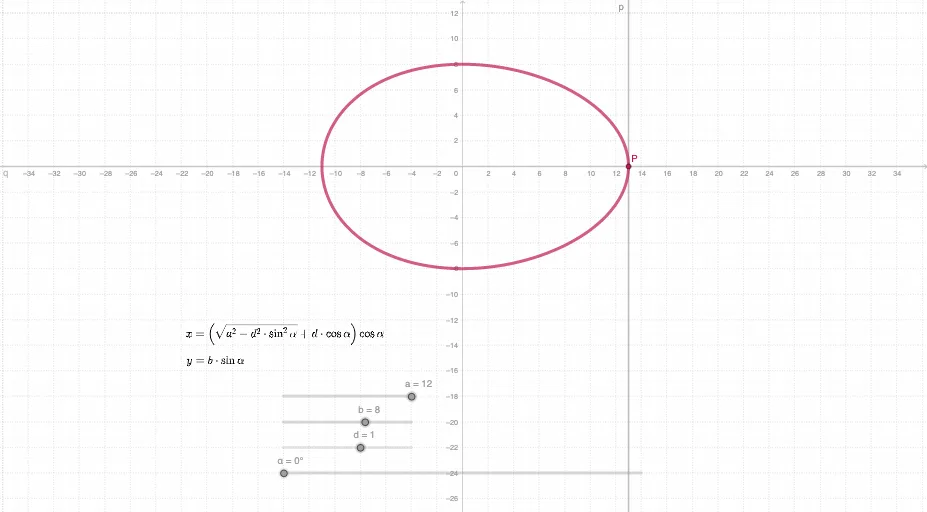
This example demonstrates how to construct the “Hügelschäffer egg” curve by using parameter-driven geometric constraints, producing an egg-like shape as a locus of points. It highlights core ideas from parametric curves and trigonometry, especially relationships involving the tangent function, together with straight-line constraints and angle parameters. The construction is built around GeoGebra commands Intersect and Locus: Intersect computes key intersection points that encode the defining conditions, while Locus traces the resulting path to form the curve. The listed objects (d, α, a, b, q, p, P, c, tx, ty) serve as parameters, directions, and intermediate points that connect trigonometric parameterization to geometric line relations. Suitable for upper secondary to early undergraduate lessons on functions, trigonometry, and geometric construction with locus/parametric descriptions, as well as for exploratory visualization of how curve definitions emerge from intersection-based rules.
GeoGebra Commands & Parameters
Intersect(p, q) → PLocus(P, α) → c
AI Drawing Prompt Reference
Draw a parametric curve in the style of a “Hügelschäffer egg”: first define two parameter-dependent geometric lines and compute their intersection point as the key point P. Then, using P as the moving point while the parameter α varies, plot its locus to obtain the curve c. Emphasize that P is determined by the intersection condition and c is traced as the parametric trajectory of P, producing an egg-like shape. Include α as the parameter controlling the curve’s form.
The prompt above was compiled from the original drawing commands and is for reference only.