
Cinquefoil Knot as a Parametric Cartesian Curve in GeoGebra
Loading the math board and drawing, please wait…
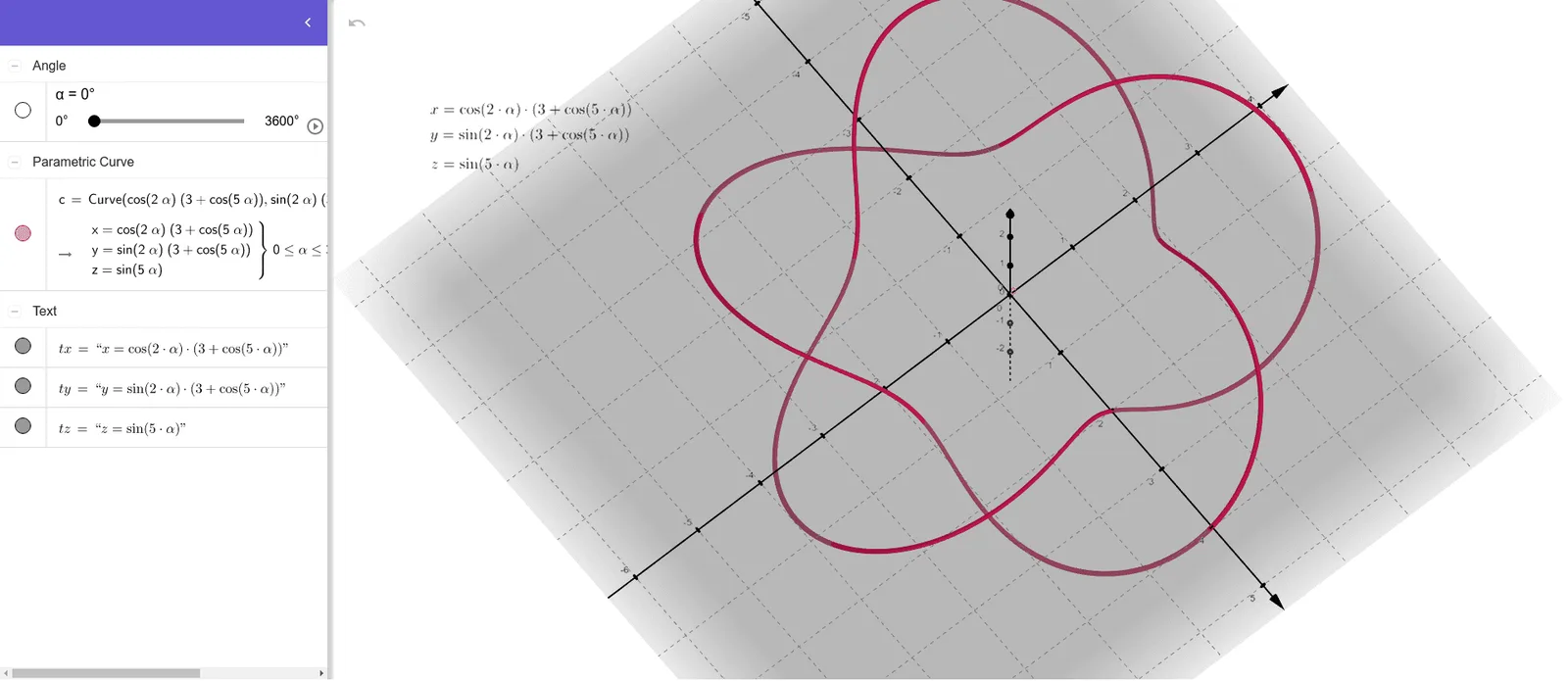
This example demonstrates how to render the Cinquefoil knot in 3D by constructing a parameterized Cartesian curve. It visualizes the characteristic multi-lobed knot structure using algebraic parameter-to-coordinate mappings. The key mathematical ideas are parametric equations, constructing a spatial curve from coordinate component expressions, and shaping the curve via exponent (power) terms and scalar/dilation parameters that control the knot’s geometry. Construction-wise, the provided GeoGebra summary indicates the use of the CurveCartesian command to generate the curve from objects representing parameter α and the coordinate functions/components tx, ty, tz, together with a scaling/constant parameter c that adjusts size or proportions. Suitable for high school advanced study and university-level visualization, especially for lessons on parametric curves, geometric construction, and intuitive exploration of knot-like forms.
GeoGebra Commands & Parameters
CurveCartesian((cos((2 * α)) * (3 + cos((5 * α)))), (sin((2 * α)) * (3 + cos((5 * α)))), sin((5 * α)), α, 0, 3600) → c
AI Drawing Prompt Reference
Draw a cinquefoil knot as a parametric Cartesian curve. First, define the parameter α. Then, use trigonometric functions and cosine to generate coordinate components for x, y, and z. The x and y components involve cos(2α) and sin(2α), while the z component is sin(5α). Adjusting the range of α controls the shape and size of the curve. The curve is formed by these components, creating a multi-lobed knot-like shape.
The prompt above was compiled from the original drawing commands and is for reference only.