
Parametric Torus Surface Modeling in 3D
Loading the math board and drawing, please wait…
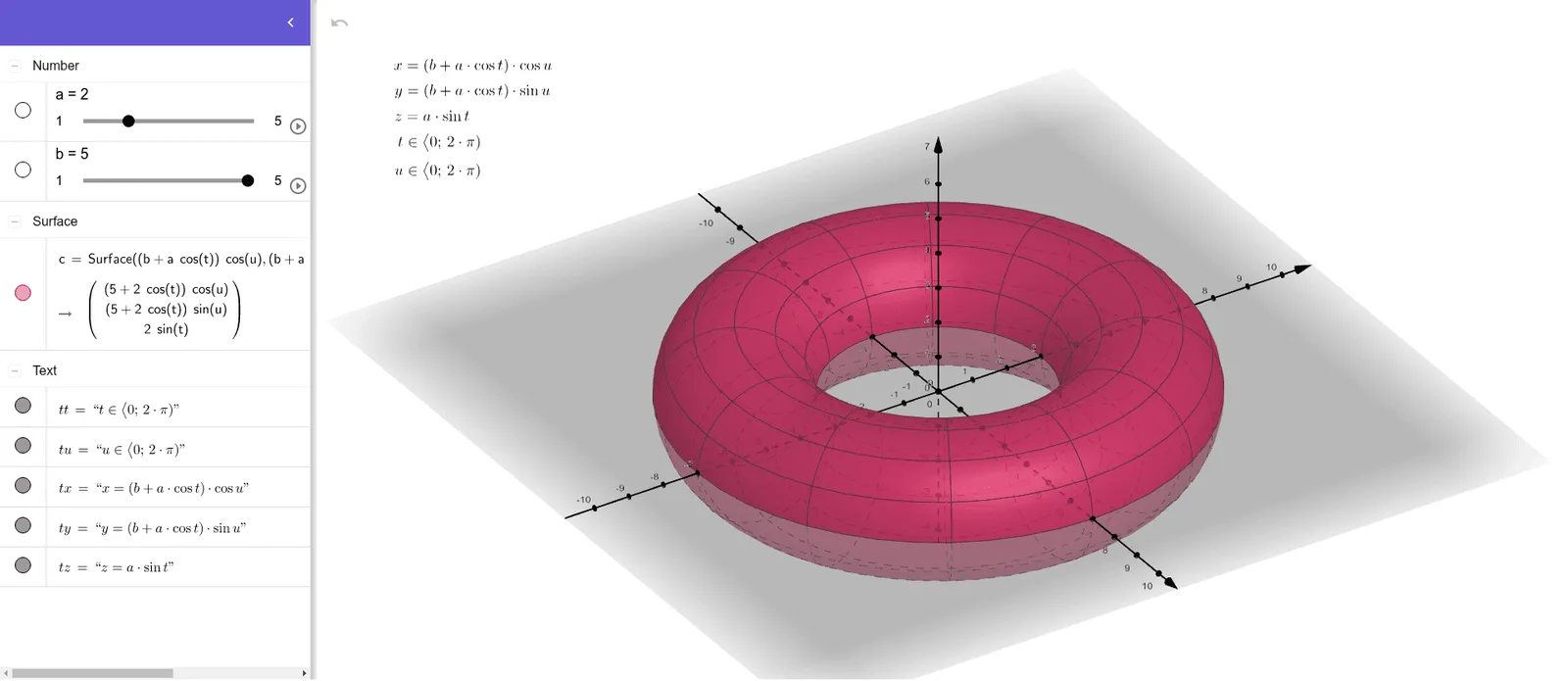
This example demonstrates how to construct a torus (a doughnut-shaped solid) as a smooth 3D surface in GeoGebra, illustrating how a complex geometry can be generated continuously from parameters. The main mathematical ideas are parametric surfaces, trigonometric parameterization, and 3D analytic geometry/coordinate modeling. The construction is carried out using the GeoGebra command Surface to render the surface. From the provided construction summary, objects b, a, c act as geometric parameters controlling the torus shape, while tx, ty, tz represent the computed x/y/z coordinate components. The parameters tt and tu correspond to the variables used to sweep the surface (typically angle-like parameters), linking trigonometric expressions to spatial coordinates. Suitable for late secondary school through early university students, and useful for lessons on parametric equations, trigonometry, and solid geometry visualization.
GeoGebra Commands & Parameters
Surface(((b + (a * cos(t))) * cos(u)), ((b + (a * cos(t))) * sin(u)), (a * sin(t)), t, 0, (2 * π), u, 0, (2 * π)) → c
AI Drawing Prompt Reference
Draw a 3D torus surface. The torus is generated by rotating a circle with radius a around a circle of radius b. Parameters a and b control the size, and angle parameters t and u generate the surface. Ensure the surface is smooth and covers the entire torus area.
The prompt above was compiled from the original drawing commands and is for reference only.