
Möbius Strip Surface: Parametric Construction and One-Sidedness
Loading the math board and drawing, please wait…
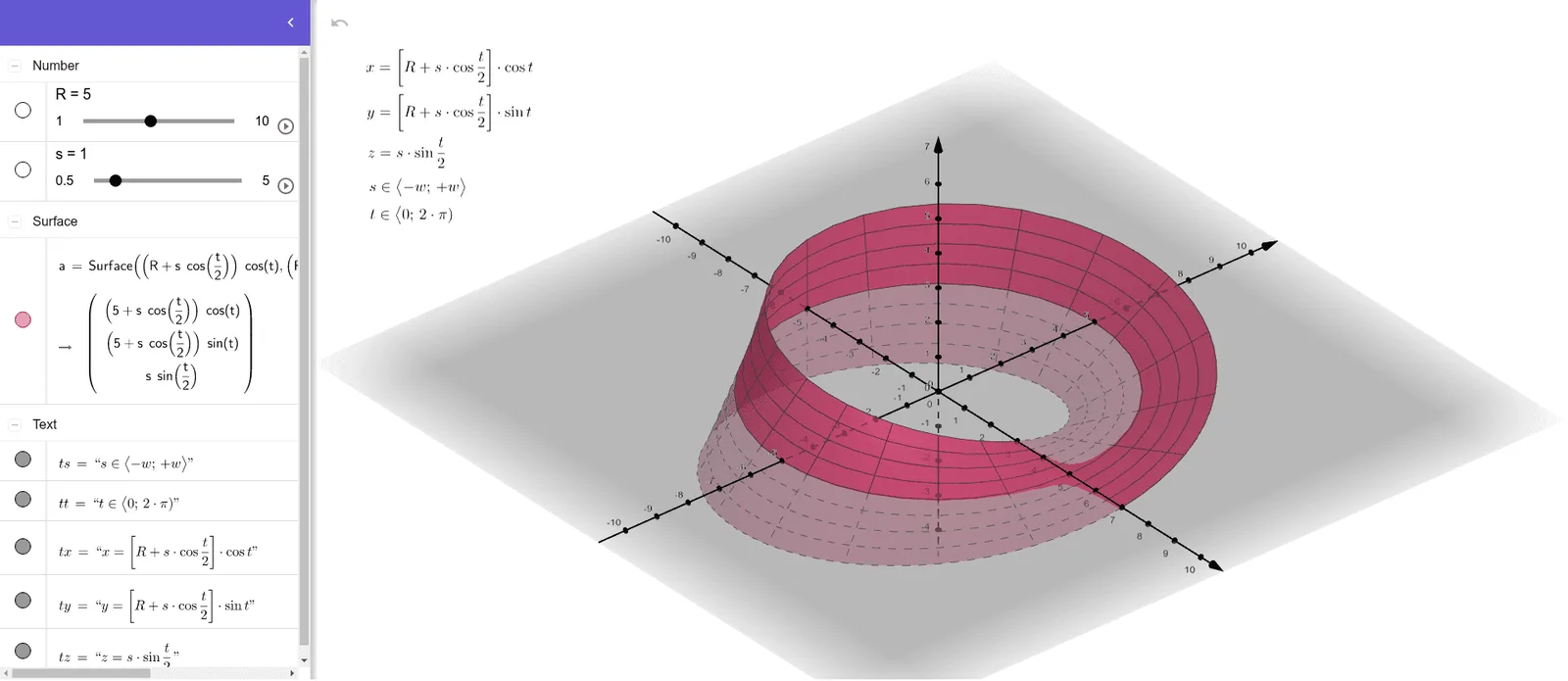
This example demonstrates how to construct and visualize the Möbius strip as a parametric surface in GeoGebra, helping learners observe the key topological behavior: the surface is one-sided and has a single boundary component. It is grounded in core ideas such as non-orientable surfaces, parameterized equations, and the use of a surface model rather than a standard plane curve. In the construction, the Surface command is used to create the geometry, with parameters including R (a parameter domain), s (the surface parameter), and a (a scale/size parameter). The coordinates are built from expressions for tx, ty, and tz that map parameters to 3D positions, along with ts and tt to define how the parameters run over their intervals. Suitable for advanced high school, undergraduate visualization, and introductory topology/topological intuition sessions.
GeoGebra Commands & Parameters
Surface(((R + (s * cos(t / 2))) * cos(t)), ((R + (s * cos(t / 2))) * sin(t)), (s * sin(t / 2)), s, -2, 2, t, 0, (2 * π)) → a
AI Drawing Prompt Reference
Create a 3D parametric surface of a Möbius strip. The strip has a circular centerline of radius R, with a width parameter s ranging from -2 to 2, and a twist parameter t from 0 to 2π. Each point on the surface is defined by three coordinates: the x and y coordinates combine the centerline radius with the local offset s times the cosine of half the twist angle, while the z coordinate is the local offset times the sine of half the twist angle. The result is a one-sided, non-orientable band with a single continuous boundary edge, showing the characteristic half-twist before closing.
The prompt above was compiled from the original drawing commands and is for reference only.