
Hypotrochoid (Inner Trochoid) Drawn via Parametric Intersection and Locus
Loading the math board and drawing, please wait…
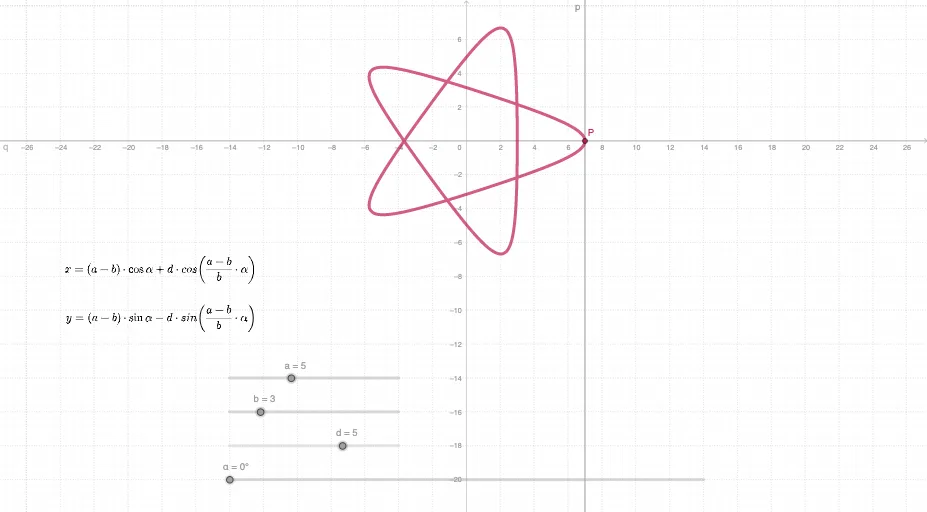
This GeoGebra example demonstrates how a hypotrochoid (inner trochoid) can be visualized as a smooth, often closed curve generated from the interplay of circular motion and parameter-controlled geometry. It centers on parameterized curves and the role of trigonometric functions in producing coordinates over time, along with the geometric meaning of radius ratios and offsets between the generating circles. Construction-wise, it uses Intersect to compute key intersection points of the involved geometric objects, and then applies Locus to trace the path of the selected point as parameters evolve. The construction relies on parameters such as d, b, α, a, q, p, P, c, and coordinate variables tx, ty (from the provided construction summary) to control the curve’s shape. Suitable for advanced secondary education, pre-university, and introductory undergraduate geometry/dynamics visualization, especially for lessons on parametric equations, trigonometric curve generation, and locus-based construction.
GeoGebra Commands & Parameters
Intersect(p, q) → PLocus(P, α) → c
AI Drawing Prompt Reference
Draw a hypotrochoid curve generated by a point attached to a smaller circle rolling inside a larger fixed circle. The curve's shape is controlled by the ratio of the two radii and the distance from the rolling circle's center to the tracing point. Show the two circles, the tracing point, and the smooth, possibly closed curve with loops or cusps that results from the point's motion as the smaller circle rolls.
The prompt above was compiled from the original drawing commands and is for reference only.