
Clockwise Rotation Construction: Angles and Segment Mapping
Loading the math board and drawing, please wait…
In collections
NOTES_Rotations
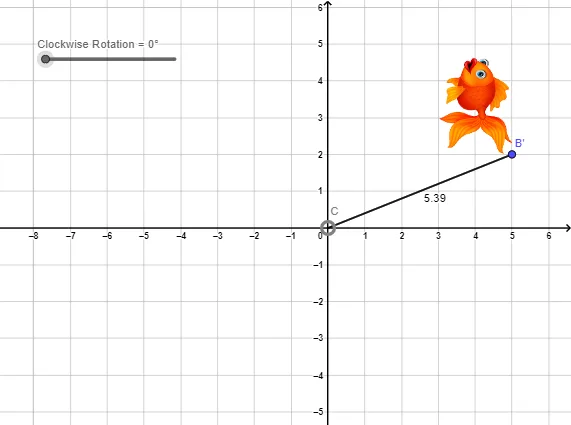
This example demonstrates how to perform a clockwise rotation in the plane for a given segment/point using a specified rotation angle, and how to relate the pre- and post-rotation positions. The main mathematical ideas include geometric transformations (Rotation), measuring/using an Angle as the rotation parameter, constructing segments (Segment), and verifying the invariance of key lengths via Distance. Construction approach in GeoGebra: create the required line segments with Segment; apply Rotate around a center point C with an angle (α or β) to generate the rotated images such as the corresponding point B'; then use Distance to check that relevant distances/lengths are preserved under the rotation. The construction objects referenced in the command summary—C, α, B, f, B', g, a, pic1, pic1', and β—represent the rotation center, angle parameters, original points/segments, and their rotated counterparts. Suitable for middle school to early high school geometry instruction and for lessons on transformation geometry and interactive geometric constructions.
GeoGebra Commands & Parameters
Segment(C, B) → fRotate(B, (-α)) → B'Segment(C, B') → gDistance(f, g) → aRotate(pic1, (-α), C) → pic1'Angle(B', C, B) → β
AI Drawing Prompt Reference
Draw a plane configuration with a rotation center C and a rotation angle parameter α. First construct the segment f joining C to the original point B. Rotate point B clockwise by angle α about C to obtain the corresponding point B'. Then draw the segment g joining C to B'. Indicate the length/measurement relationship between the two segments f and g. Apply the same clockwise rotation of angle −α to the whole figure pic1 to obtain its rotated image pic1'. Finally construct the angle β determined by the points B', C, and B to show the angle between the pre- and post-rotation positions.
The prompt above was compiled from the original drawing commands and is for reference only.