
270° CCW Rotation of a Polygon: Geometric Transformation
Loading the math board and drawing, please wait…
In collections
NOTES_Rotations
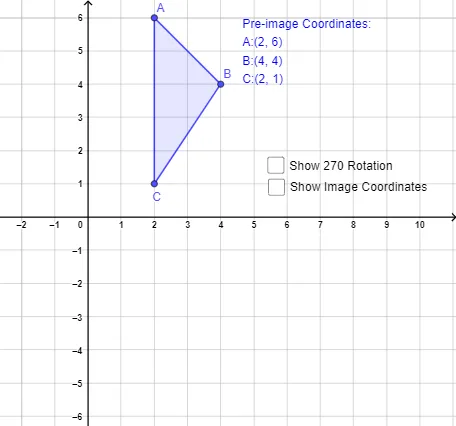
This example demonstrates a rigid transformation in the plane by rotating a constructed polygon 270° counterclockwise around a specified center. It visually highlights the point-to-point correspondence between the original vertices and their rotated images, emphasizing how the figure changes position while preserving the transformation structure. The key concepts are geometric rotation, counterclockwise orientation, angle measurement, and the behavior of polygons under rigid motions. Construction-wise, it uses the Polygon command to build the original polygon from points such as A, B, C (and related parameters like t1, c, a, b), then applies the Rotate command to generate the rotated points/labels (A', B', C', t1', c', a', b'). Text annotations (text1, text2) help present the rotation information. Suitable for middle and high school geometry lessons, especially when introducing or reviewing transformations and their graphical interpretation.
GeoGebra Commands & Parameters
Polygon(A, B, C) → t1, c, a, bRotate(A, ((3 * π)) / 2, (0, 0)) → A'Rotate(B, ((3 * π)) / 2, (0, 0)) → B'Rotate(C, ((3 * π)) / 2, (0, 0)) → C'Polygon(A', B', C') → t1', c', a', b'
AI Drawing Prompt Reference
In a coordinate plane, first draw a triangle by choosing three points and showing the polygon and its vertices. Then take the origin as the rotation center and rotate the triangle counterclockwise by 270°, creating the three corresponding rotated vertices and the rotated polygon. Display both the original and rotated triangles together, keeping the vertex-to-vertex correspondence clear through their positions. Add brief text annotations indicating that the transformation is a counterclockwise 270° rotation.
The prompt above was compiled from the original drawing commands and is for reference only.