
Geometric Construction: 180° CCW Rotation
Loading the math board and drawing, please wait…
In collections
NOTES_Rotations
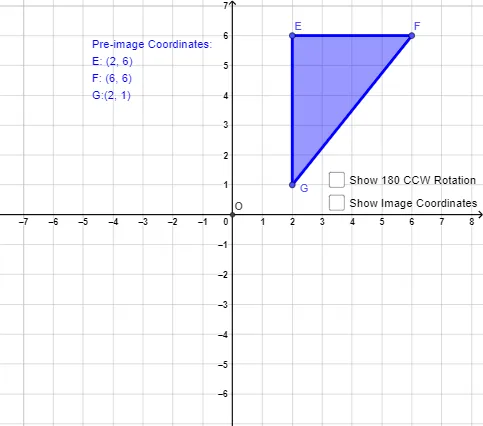
This example demonstrates how to rotate a planar figure by 180° counterclockwise about a chosen center and obtain the corresponding rotated points and lines. It highlights the key mathematical ideas of rigid transformations, the definition of a rotation (center as a fixed point), direction (CCW), and the preservation of geometric relationships between original and image objects. Construction is carried out in GeoGebra by using Polygon to build the involved polygonal shapes (e.g., points like E, F, G), Intersect to compute relevant intersection points that support the configuration (such as objects c, a, b, d, e), and Rotate to perform the 180° CCW transformation, producing the images of the original objects (E′, F′, G′, t1′, g′, e′, f′). Labels (text1, text2) are added to emphasize the main correspondences. Suitable for middle school geometry, transformation drills, and foundational geometry proof practice.
GeoGebra Commands & Parameters
Polygon(E, F, G) → t1, c, a, bIntersect(xAxis, yAxis) → ORotate(E, π, O) → E'Rotate(F, π, O) → F'Rotate(G, π, O) → G'Polygon(E', F', G') → t1', g', e', f'
AI Drawing Prompt Reference
Draw a triangle t1 with points E, F, and G, then rotate it 180 degrees counterclockwise around point O to get the rotated triangle t1', where points E, F, and G become E', F', and G' respectively.
The prompt above was compiled from the original drawing commands and is for reference only.