
Counterclockwise 90° Rotation: Corresponding Points and Polygons
Loading the math board and drawing, please wait…
In collections
NOTES_Rotations
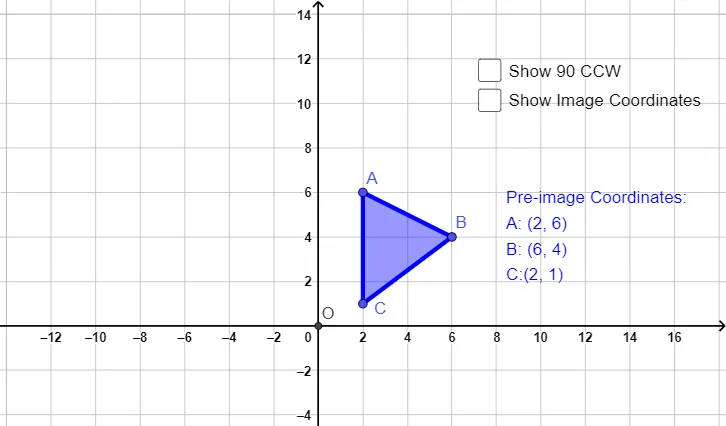
This example demonstrates how to rotate a set of points and a polygon counterclockwise by 90° (CCW), and how the rotated image forms clear correspondences with the original. It highlights key ideas in transformation geometry: rotation as a rigid motion, the meaning of a 90° directed turn, preservation of distances (congruence/equal-length relationships), and the role of the rotation center and orientation. Construction-wise, it uses Polygon to build the initial polygon from points (e.g., A, B, C and related parameters), Intersect to determine intersection points that help verify geometric relationships (e.g., objects like d, e), and Rotate to generate the rotated counterparts about a center O (e.g., A', B', C' and associated auxiliary objects such as a', b', c', t1'). Text labels are added to emphasize matching between pre- and post-rotation objects. Suitable for secondary school geometry, transformation/rigid-motion lessons, and interactive classroom demonstrations or practice.
GeoGebra Commands & Parameters
Polygon(A, B, C) → t1, c, a, bIntersect(xAxis, yAxis) → ORotate(A, π / 2, O) → A'Rotate(B, π / 2, O) → B'Rotate(C, π / 2, O) → C'Polygon(A', B', C') → t1', c', a', b'
AI Drawing Prompt Reference
Draw a polygon formed by three points and mark its center. Then, rotate this polygon counterclockwise by 90 degrees around the center to create a new rotated polygon. Clearly show the corresponding vertices between the original and rotated polygons, adding text labels to emphasize the matches. Also, draw the coordinate axes and mark their intersection point as the rotation center.
The prompt above was compiled from the original drawing commands and is for reference only.