
Triangle Dilations and Finding the Center (Dilations3_Finding Center)
Loading the math board and drawing, please wait…
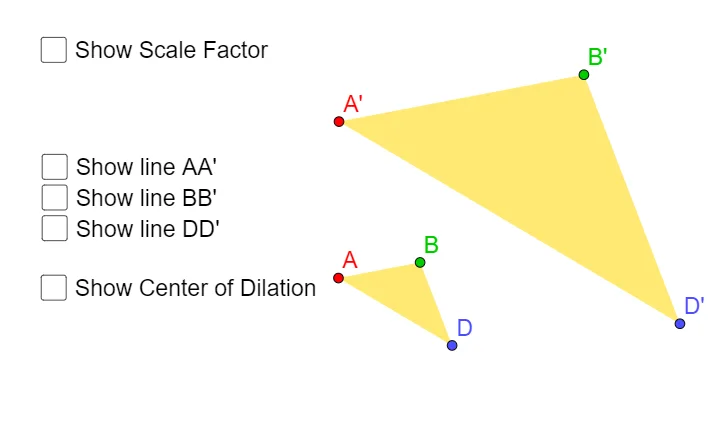
This example demonstrates how applying a dilation (scaling transformation) to a triangle can be used to identify a key geometric center from the relationships between original points and their images. It centers on similarity under transformation, the proportional mapping of segments and lines, and how triangle centers (e.g., orthocenter/related constructions depending on the setup) can be characterized via transformed lines and intersections. Construction highlights in GeoGebra: Polygon is used to build the initial triangular polygon from points A, B, and C (and additional point labeling such as D as needed by the configuration). Dilate generates the scaled images A', B', and D' controlled by parameters (including a, b, k and associated scaling factor k). Line is then used to draw the reference lines (e.g., t1, d, a, b, c, etc.) and their dilated counterparts (t1', d'), and the sought center is obtained by analyzing intersection/correspondence between the original and transformed objects. Suitable for secondary-level geometry on transformations and similarity, as well as enrichment/olympiad-oriented geometry practice and classroom demonstrations.
GeoGebra Commands & Parameters
Polygon(A, B, D) → t1, d, a, bDilate(A, k, C) → A'Dilate(B, k, C) → B'Dilate(D, k, C) → D'Polygon(A', B', D') → t1', d', a', b'Line(A, A') → fLine(B, B') → gLine(D, D') → h
AI Drawing Prompt Reference
Draw a triangle ABC, then perform a similarity transformation centered at point C to generate triangle A'B'C'. Next, draw lines connecting points A to A', B to B', and D to D'. Analyze the relationships between these lines and their transformed counterparts to identify the key geometric center.
The prompt above was compiled from the original drawing commands and is for reference only.