
3.2 Tiles: Exploring Vector Translation and Symmetry Transformations
Loading the math board and drawing, please wait…
In collections
geometriadinamica.es
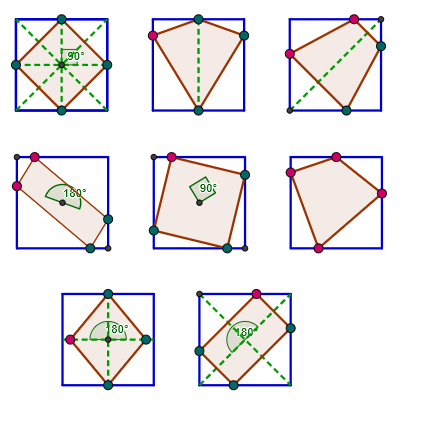
① This example demonstrates how to construct a tiling-like pattern using vector translations, reflections, and rotations of basic geometric shapes, showing the combined effects of transformations in the 2D plane. ② Core concepts include 2D vectors, translation, axial symmetry, rotation, midpoints, perpendicular lines, and properties of triangles and rectangles, along with angle and trigonometric relationships. ③ Construction uses GeoGebra commands such as Line, Circle, Intersect, Polygon, Point, Vector, Translate, Midpoint, Segment, Mirror, OrthogonalLine, Rotate, and Angle, with multiple objects (A, B, C, poly1, u, A', C', D', E', etc.) to perform successive transformations. ④ Suitable for middle or high school geometry or vector lessons, helping students understand composition of transformations, symmetry, and how to create patterns through construction commands, also useful for math-art integration activities.
GeoGebra Commands & Parameters
Line(A, B) → bCircle(A, a) → cIntersect(c, b, 2) → CPolygon(A, C, 4) → poly1, d, e, f, g, D, EPoint(b) → FVector(A, F) → uTranslate(A, u) → A'Translate(C, u) → C'Translate(D, u) → D'Translate(E, u) → E'Polygon(A', C', D', E') → poly1', a', c', d', e'Translate(A', u) → A''Translate(C', u) → C''Translate(D', u) → D''Translate(E', u) → E''Polygon(A'', C'', D'', E'') → poly1'', a'', c'', d'', e''Translate(A'', u) → A'''Translate(C'', u) → C'''Translate(D'', u) → D'''Translate(E'', u) → E'''Translate(A''', u) → GTranslate(C''', u) → HTranslate(D''', u) → ITranslate(E''', u) → JTranslate(G, u) → G'Translate(H, u) → H'Translate(I, u) → I'Translate(J, u) → J'Point(e') → SPoint(d'') → TPoint(e'') → UVector(A, L_1) → v_1Translate(A, v_1) → A'_1Translate(C, v_1) → C'_1Translate(D, v_1) → D'_1Translate(E, v_1) → E'_1Polygon(A'_1, C'_1, D'_1, E'_1) → poly1'_1, a'_1, c'_1, d'_1, e'_1Translate(A', v_1) → A''_1Translate(C', v_1) → C''_1Translate(D', v_1) → D''_1Translate(E', v_1) → E''_1Polygon(A''_1, C''_1, D''_1, E''_1) → poly1''_1, a''_1, c''_1, d''_1, e''_1Midpoint(e'_1) → M_1Midpoint(c'_1) → N_1Midpoint(d'_1) → O_1Midpoint(a'_1) → P_1Midpoint(O_1, P_1) → Q_1Segment(M_1, Q_1) → d_1Point(d_1) → R_1Midpoint(e''_1) → S_1Midpoint(d''_1) → T_1Midpoint(a''_1) → U_1Midpoint(T_1, U_1) → V_1Mirror(R_1, Q_1) → Z_1Polygon(O_1, R_1, P_1, Z_1) → poly10, o_1, r_1, p_1, z_1Segment(C, E) → q_1Segment(A, D) → s_1Segment(A'', D'') → b_2Segment(P_1, O_1) → c_2Segment(A''_1, D''_1) → d_2Segment(E''_1, C''_1) → e_2Segment(M_1, N_1) → f_2Midpoint(f) → KMidpoint(g) → MMidpoint(d) → NMidpoint(e) → OPolygon(K, M, N, O) → poly3, k, m, n, oMidpoint(d') → PMidpoint(a') → ROrthogonalLine(S, e') → pOrthogonalLine(T, b_2) → qOrthogonalLine(U, b_2) → rIntersect(c', p) → QIntersect(a'', r) → VIntersect(q, c'') → WPolygon(S, P, Q, R) → poly4, s, p_2, q_2, r_2Polygon(U, T, W, V) → poly5, u_1, t, w, vSegment(V_1, E''_1) → c_1Segment(P, R) → e_1Segment(K, N) → l_1Segment(O, M) → m_1Vector(A, B_2) → n_1Translate(A, n_1) → A'_2Translate(C, n_1) → C'_2Translate(D, n_1) → D'_2Translate(E, n_1) → E'_2Polygon(A'_2, C'_2, D'_2, E'_2) → poly1'_2, a'_2, c'_2, d'_2, e'_2Translate(A', n_1) → A''_2Translate(C', n_1) → C''_2Translate(D', n_1) → D''_2Translate(E', n_1) → E''_2Polygon(A''_2, C''_2, D''_2, E''_2) → poly1''_2, a''_3, c''_2, d''_3, e''_2Translate(A'', n_1) → A'''_1Translate(C'', n_1) → C'''_1Translate(D'', n_1) → D'''_1Translate(E'', n_1) → E'''_1Polygon(A'''_1, C'''_1, D'''_1, E'''_1) → poly1'''_1, a'''_1, c'''_1, d'''_1, e'''_1Point(d'_2) → D_2Point(e'_2) → H_2Midpoint(E'_2, C'_2) → I_2Midpoint(E''_2, C''_2) → J_2Point(d''_3) → K_2Point(d'''_1) → L_2Point(e'''_1) → M_2Point(a'''_1) → N_2Point(c'''_1) → P_2Mirror(D_2, I_2) → O_2Mirror(H_2, I_2) → Q_2Rotate(K_2, 90°, J_2) → R_2Mirror(K_2, J_2) → S_2Polygon(D_2, H_2, O_2, Q_2) → poly11, d_3, h_2, o_2, q_3Mirror(R_2, J_2) → T_2Polygon(K_2, R_2, S_2, T_2) → poly12, k_2, r_3, s_2, t_2Polygon(L_2, M_2, N_2, P_2) → poly13, l_2, m_2, n_2, p_3Angle(Q_2, I_2, H_2) → γAngle(T_2, J_2, K_2) → δPoint(d''_1) → LMirror(L, d_2) → L'Mirror(L, e_2) → L'_1Mirror(L', e_2) → L''Polygon(L, L', L'', L'_1) → poly2, l, l', l'', l'_1Angle(D''_1, V_1, A''_1) → αIntersect(l_1, m_1) → ZAngle(O, Z, K) → βAngle(Z_1, Q_1, R_1) → ε
AI Drawing Prompt Reference
Create a pattern composed of triangles and rectangles using transformations such as translation, reflection, and rotation. Start by drawing a triangle and a rectangle, then generate a series of repeated patterns by translating these basic shapes. Use reflection and rotation to further transform these patterns, creating a complex symmetric pattern. Finally, generate multiple repeated patterns through translation and rotation to form a complete set of patterns.
The prompt above was compiled from the original drawing commands and is for reference only.