
Basis Vectors Demo
Loading the math board and drawing, please wait…
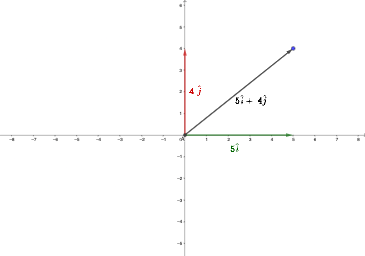
This example demonstrates fundamental concepts of vectors in two-dimensional space. Key math concepts include vector representation, orthogonal lines, midpoint calculation, and vector intersections. Using GeoGebra commands like Intersect, Vector, OrthogonalLine, and Midpoint, geometric properties and computations of vectors are visually illustrated. Suitable for high school and introductory university students learning vector algebra, coordinate geometry, and calculus basics.
GeoGebra Commands & Parameters
Intersect(xAxis, yAxis) → AVector(A, B) → uOrthogonalLine(B, xAxis) → fOrthogonalLine(B, yAxis) → gIntersect(g, yAxis) → CIntersect(f, xAxis) → DVector(A, C) → vVector(A, D) → wMidpoint(C, A) → EMidpoint(A, D) → FMidpoint(B, A) → G
AI Drawing Prompt Reference
Draw a 2D coordinate plane with both coordinate axes and mark their intersection as the reference point. Choose two points so that by constructing perpendicular lines from one key point to the x-axis and y-axis, you obtain two projection intersection points on the axes. Construct two vectors originating at the reference point and ending at those two projection points, illustrating the basic vector directions. Then compute several midpoints of the relevant segments: include the midpoint of the segment from each projection point to the reference point, and also midpoints formed from additional pairs involving the reference and one projection, to emphasize midpoint relationships in vector geometry.
The prompt above was compiled from the original drawing commands and is for reference only.