
Gravitational Acceleration Simulation
Loading the math board and drawing, please wait…
In collections
The Domain of the Time (intuitive kinematics)
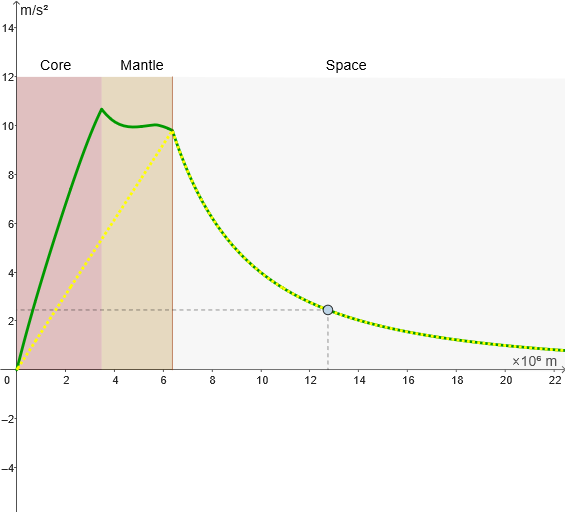
This example demonstrates the calculation and visualization of gravitational acceleration on Earth's surface. Key math concepts include vectors, 2D coordinate geometry, similarity transformation, Pythagorean theorem, and limits. Construction highlights involve commands like Segment, Point, Circle, and objects such as O, rT, s, f, tierraH, M, mT, G, gh, x1, x2, gr, g, c, texto3, texto4, texto5, l1, l2, l3, dT, tierraR, d, MM, texto1, l4, botón1, botón2, cc, h. Suitable for high school physics and mathematics education to understand the relationship between gravitational acceleration and the law of universal gravitation.
GeoGebra Commands & Parameters
Segment(O, O + (0, (2 * s))) → fPoint(f) → MCircle((0, 0), rT / 10^(6)) → cCircle(O, x1) → dCircle((0, 0), rT / 10^(6)) → ccSegment((rT / 10^(6), 0), (rT / 10^(6), 12)) → h
AI Drawing Prompt Reference
Draw a geometric simulation of gravitational acceleration on Earth's surface. In a 2D coordinate system, start from the origin point O and draw a vertical line segment upward, with a movable point M on this segment. Create two concentric circles centered at the origin: a smaller circle with radius representing a scaled Earth radius, and a larger circle with radius x1. To the right of the small circle, draw a vertical line segment extending from the ground upward into space. This construction demonstrates the relationship between gravitational acceleration and the law of universal gravitation using vectors, coordinate geometry, and similarity transformations.
The prompt above was compiled from the original drawing commands and is for reference only.