
Simple Pendulum Demonstration
Loading the math board and drawing, please wait…
In collections
The Domain of the Time (intuitive kinematics)
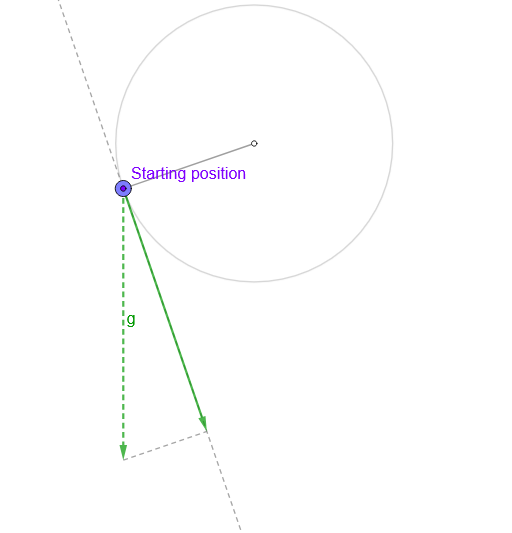
This example demonstrates the motion trajectory and physical principles of a simple pendulum. It involves core mathematical concepts such as vectors, trigonometry, limits, and coordinate geometry. The construction utilizes GeoGebra commands like Circle, Arc, Point, Segment, UnitOrthogonalVector, If, mean, Angle, Sum, Ray, Line, and Mirror. It is suitable for high school students and math enthusiasts studying simple harmonic motion and geometric modeling.
GeoGebra Commands & Parameters
Circle(O, l) → cArc(c, Point[c, 0.76389], Point[c, 0.25]) → arcPoint(arc) → PPoint(c) → MSegment(O, M) → rUnitOrthogonalVector(r) → nSegment(M + g, M + gt) → sIf(Length[reg] ≟ 1, {reg(1)}, Sequence[reg(k) - reg(k + 1), k, 1, Length[reg] - 1]) → regDifmean(regDif) → TAngle(P, O, (x(O), -100)) → ampSum(Sequence[((((2 * k))! / ((2^((2 * k)) * (k!)^(2))))^(2) * (sin(amp / 2))^((2 * k))), k, 0, 83]) → sumRay(O, O + (0, -1)) → fLine(P, P + (1, 0)) → hMirror(P, f) → P'Segment(O, P) → rPLine(M, gt) → i
AI Drawing Prompt Reference
Draw a simple pendulum with a swing path, pendulum bob, and trajectory. Start by drawing a circle as the pendulum's path, then draw an arc on the circle to represent the initial position of the pendulum bob. Next, draw a line from the center of the circle to the arc point, representing the pendulum line. Then, draw a unit vector perpendicular to the pendulum line to indicate the direction of the pendulum's motion. After that, draw the position of the pendulum bob at different times and use mirroring to get the symmetric position of the pendulum bob. Finally, draw the line connecting the pendulum line and the pendulum bob, as well as the reference line for the pendulum's motion.
The prompt above was compiled from the original drawing commands and is for reference only.