
Geometric Construction of Distance in the Coordinate Plane
Loading the math board and drawing, please wait…
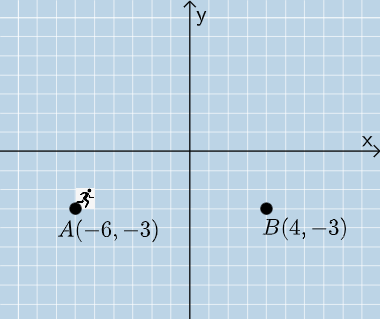
This example demonstrates how to construct the distance between two points on the coordinate plane using geometric constructions. The key mathematical ideas include coordinate geometry, vector representation, and measuring length via vector/segment magnitude, closely connected to the Pythagorean Theorem through right-triangle or equivalent length relations. Construction workflow: the scene is built from points and lines using commands such as Dilate, Vector, Line, Point, Angle, Rotate, and Translate, with Polygon used to form auxiliary regions/triangles when needed. The distance value is obtained with the Length command applied to the relevant vector or segment. The example also uses If and Mode to handle different construction cases or display states. The use of multiple labeled points/vectors (e.g., A, B, u, v, and angles like α, β) reflects a multi-step build-up toward the final distance expression (e.g., eq1 and related computed quantities). Suitable for middle to high school learners studying distance, vectors, and geometric reasoning in coordinate geometry, and appropriate for classroom demonstrations.
GeoGebra Commands & Parameters
Dilate(A, If[0 < a ≤ 1, 1 - a, 0], D) → A'Vector(A, A') → uDilate(D, If[1 < a ≤ 2, 2 - a, 0], B) → D'Vector(D, D') → vLine(A, B) → fPoint(f) → FAngle(D, A, F) → αPoint(eq1) → GAngle(G, A, F) → βRotate(H, If[0 ≤ b ≤ 1, (b * β), β], B) → H'Dilate(B, If[1 < b ≤ 2, 2 - b, 0], A) → E'Vector(B, E') → wTranslate(H', w) → H''Angle(B, D, A) → γPolygon(A, D, B) → t1, b_1, a_1, dRandomElement(l1) → cMode(l2) → l3Length(l3) → iIf(i ≟ 0, "√", "X") → corr1If(corr2, "√", "X") → text2
AI Drawing Prompt Reference
Construct the distance between two points A and B on the coordinate plane. Start by constructing vectors u and v from points A and B, then use the Dilate command to scale the vectors. Next, create auxiliary segments and angles, and adjust vector positions using Rotate and Translate commands. Finally, calculate the length of the relevant vector or segment with the Length command to obtain the distance between the two points.
The prompt above was compiled from the original drawing commands and is for reference only.