
Angles in Standard Position
Loading the math board and drawing, please wait…
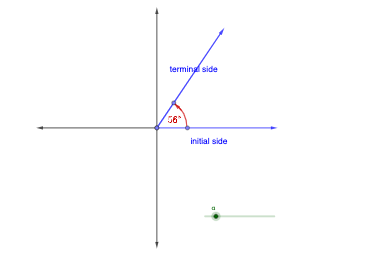
This applet demonstrates angles in standard position. It covers the basic concepts of angles, including measurement and direction. It uses GeoGebra commands such as Point, Vector, Rotate, Circle, Segment, Intersect, CircleArc, Midpoint, Ray for construction. Suitable for students from middle school and above learning geometry and trigonometry.
GeoGebra Commands & Parameters
Point(xAxis) → A_{1}Point(xAxis) → B_{1}Vector(A_{1}, B_{1}) → uRotate(u, 90°, A_{1}) → u'Rotate(u', 90°, A_{1}) → u''Rotate(u'', 90°, A_{1}) → u'''Rotate(u, α, A_{1}) → u'_{1}Circle(A_{1}, 5) → cPoint(c) → CSegment(A_{1}, B_{1}) → fRotate(A_{1}, α, A_{1}) → A'Rotate(B_{1}, α, A_{1}) → B'Segment(A', B') → f'Intersect(c, f', 1) → BIntersect(c, f, 1) → ARotate(G, α, A_{1}) → G'CircleArc(A_{1}, G, G') → dRotate(G', -20°, A_{1}) → G''Vector(G'', G') → vMidpoint(B', A_{1}) → DPoint(u) → EPoint(v) → FCircle(A_{1}, 1) → eRotate(E, α / 2, A_{1}) → E'Ray(A_{1}, E') → gIntersect(e, g, 1) → H
AI Drawing Prompt Reference
Draw an angle in standard position to demonstrate basic angle concepts, including measurement and direction. Start with two points on the x-axis to create a vector, then rotate it 90 degrees three times to get four vectors in different directions. Use a slider to control the angle α, rotate the initial vector by α, and find intersection points on a circle with radius 5. Draw the initial vector, rotated vectors, and arc to show the terminal side of the angle. Create an auxiliary circle and ray, find midpoints and intersection points, and finally display the measurement and direction of the angle.
The prompt above was compiled from the original drawing commands and is for reference only.