
Wave Superposition by Andreas Lindner
Loading the math board and drawing, please wait…
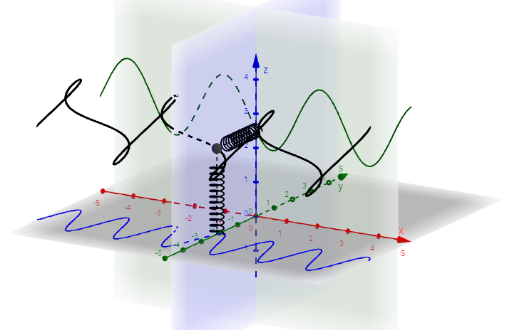
This example demonstrates the superposition of waves. Key mathematical concepts include trigonometric functions and parametric equations. Using the CurveCartesian command, different frequency and phase waves are constructed. Suitable for high school and above students to learn wave principles and function graphs.
GeoGebra Commands & Parameters
CurveCartesian(s, (A_1 * sin((ω_1 * (s - t)))) - 3, 0, s, (-2 * π), (2 * π)) → s_1CurveCartesian(s, 0, (A_2 * sin((ω_2 * (s - t)) - φ)) + 3, s, (-2 * π), (2 * π)) → s_2CurveCartesian(s, (A_1 * sin((ω_1 * (s - t)))) - 3, (A_2 * sin((ω_2 * (s - t)) - φ)) + 3, s, (-2 * π), (2 * π)) → s_3Segment(S_1, S_3) → str_2Segment(S_3, S_2) → str_1CurveCartesian((r * cos((s * ((24 * π)) / h_1))), y(S_1) + (r * sin((s * ((24 * π)) / h_1))), s, s, 0, h_1) → fed_1CurveCartesian((r * cos((s * ((24 * π)) / h_2))), (-s), z(S_2) + (r * sin((s * ((24 * π)) / h_2))), s, 0, h_2) → fed_2
AI Drawing Prompt Reference
Draw two sine waves with different frequencies and phases, one at y=-3 and the other at y=3. Then superimpose these two waves. Next, draw a circle with radius r, centered on the first wave's graph, and connect points on the circle to points on the second wave's graph to form a spiral.
The prompt above was compiled from the original drawing commands and is for reference only.