
Prediction and Confidence Intervals with a Parameter-Driven Ellipse
Loading the math board and drawing, please wait…
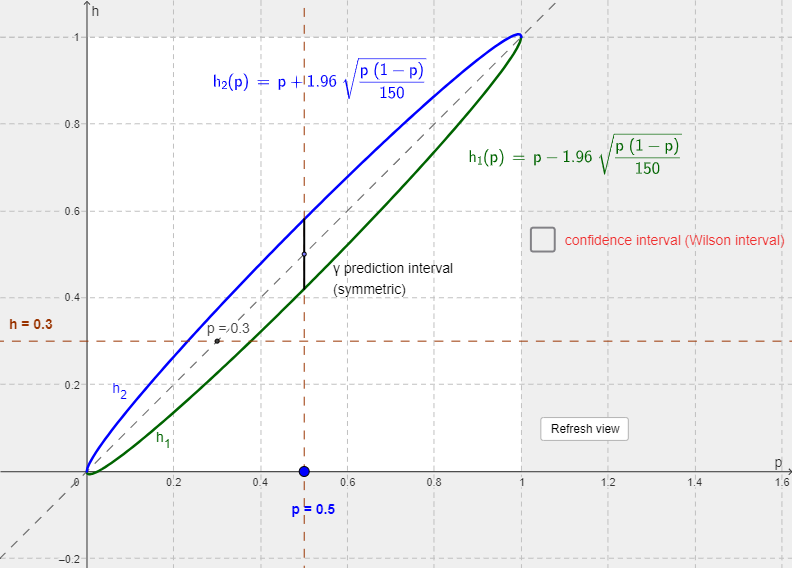
This example demonstrates how uncertainty quantification in probability (prediction intervals and confidence intervals) can be visualized geometrically, leading to an “arising” ellipse whose shape is controlled by statistical parameters. Key ideas include using the inverse normal quantile (InverseNormal) for confidence levels, constructing confidence/prediction interval bounds in a statistical setting, and connecting those bounds to analytic-geometry style ellipse construction via geometric transformations and orthogonal constructions. The model is built with GeoGebra commands such as Segment, Function, Intersect, and Point to create functional objects and compute intersection points, OrthogonalLine to enforce perpendicular structure, and Polygon/Vieleck1/LaTeX/Text objects to assemble and annotate the geometric figures. Intermediate parameters (e.g., a, b, h, h_1, h_2, etc.) are computed and then used to generate the ellipse and related reference graphics. Suitable for high-school to introductory university teaching, especially for interactive lessons on interval estimation and visual links between statistical bounds and geometric loci.
GeoGebra Commands & Parameters
Segment((0, 0), (1, 0)) → gInverseNormal(0, 1, (γ + 1) / 2) → zFunction(x, 0, 1) → bIntersect(h_2, a, (0.2324355323373903, 0.30003)) → AIntersect(h_1, a, (0.37761106957187346, 0.30003)) → BPoint(g) → GOrthogonalLine(G, xAxis) → cIntersect(h_2, c, (0.5004195263204818, 0.5804346927606767)) → DIntersect(h_1, c, (0.5004195263204818, 0.4204043598802869)) → ESegment(E, D) → dSegment(A, B) → konfintSegment(E, D) → fLaTeX(h_2, true, true) → Text1LaTeX(h_1, true, true) → Text2Intersect(b, c) → CPolygon((0, 0), (1, 0), (1, 1), (0, 1)) → Vieleck1, i, j, k, lIntersect(d, a) → I
AI Drawing Prompt Reference
Draw an ellipse controlled by parameters, start by drawing a horizontal line segment, then calculate a point using the inverse normal function, followed by drawing a horizontal line and constructing the ellipse through its intersection with the point. Also, draw prediction and confidence intervals, connect these intervals with line segments, and add corresponding mathematical formula annotations.
The prompt above was compiled from the original drawing commands and is for reference only.