
Water Molecule Structure
Loading the math board and drawing, please wait…
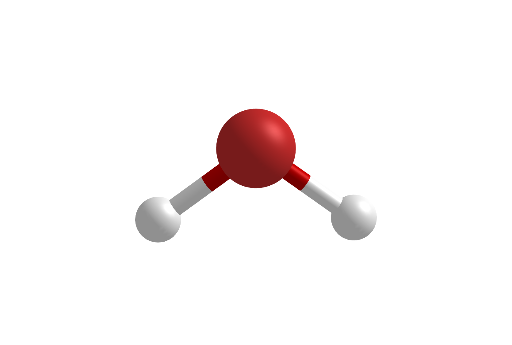
This example demonstrates the structure of a water molecule. It involves core concepts of spheres, equilateral triangles, and solid geometry. Using GeoGebra commands such as Point, Segment, Rotate, Midpoint, Sphere, and Cylinder, the water molecule model can be constructed. Suitable for high school chemistry and mathematics education, helping students understand molecular structure and basic principles of solid geometry.
GeoGebra Commands & Parameters
Point(xAxis) → EPoint(xAxis) → FSegment(E, F) → iPoint(i) → APoint(i) → BRotate(A, -37°, yAxis) → A'Rotate(A', -106°, yAxis) → A''Midpoint(B, A'') → CMidpoint(B, A') → DMidpoint(B, C) → GSphere(B, 1.3) → jMidpoint(B, D) → HCylinder(G, C, 0.3) → a, c, d, bCylinder(H, D, 0.3) → e, f, g, hCylinder(C, A'', 0.3) → m, p, q, nCylinder(D, A', 0.3) → o, r, s, tSphere(A', 0.75) → kSphere(A'', 0.75) → l
AI Drawing Prompt Reference
Draw a water molecule model with one oxygen atom and two hydrogen atoms. The oxygen atom is at the center, with two hydrogen atoms on either side. Start by creating two points E and F on the x-axis and connecting them to form line segment i. From the midpoint B, rotate to create hydrogen atoms A and A'. Then, use midpoints C and D to create the connections between hydrogen atoms and oxygen atom. Finally, use spheres to represent the hydrogen and oxygen atoms, and cylinders to represent the connections between hydrogen and oxygen atoms.
The prompt above was compiled from the original drawing commands and is for reference only.