
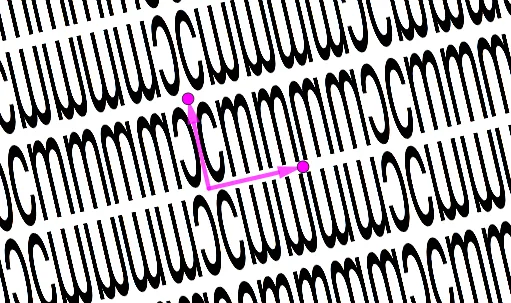
Wallpaper Symmetry Group cmm
Loading the math board and drawing, please wait…
In collections
Wallpaper Symmetry Groups
This example demonstrates the geometric properties and phenomena of Wallpaper Symmetry Group cmm. It involves core mathematical concepts such as symmetry, vectors, and geometric transformations. The construction utilizes GeoGebra commands and objects like Intersect, Vector, OrthogonalLine, Point, Line, Midpoint, Mirror, Circle, and Sequence. Suitable for high school and above learning geometric transformations and symmetry.
GeoGebra Commands & Parameters
Intersect(xAxis, yAxis) → AVector(A, B) → uOrthogonalLine(A, u) → fPoint(f) → CVector(A, C) → vLine(C, D) → gLine(D, B) → hMidpoint(C, D) → EMidpoint(D, B) → FOrthogonalLine(F, h) → iMirror(F, g) → F'OrthogonalLine(F', h) → jCircle(A, B) → cMirror(pic1, g) → pic1'Mirror(pic1, h) → pic1'_1Mirror(Mirror[pic1, h], g) → pic2Sequence(Sequence[Translate[pic1, Vector[((2 * a) * v) + ((2 * b) * u)]], a, -10, 10], b, -10, 10) → L_1Sequence(Sequence[Translate[pic1', Vector[((2 * a) * v) + ((2 * b) * u)]], a, -10, 10], b, -10, 10) → L_2Sequence(Sequence[Translate[pic2, Vector[((2 * a) * v) + ((2 * b) * u)]], a, -10, 10], b, -10, 10) → L_3Sequence(Sequence[Translate[pic1'_1, Vector[((2 * a) * v) + ((2 * b) * u)]], a, -10, 10], b, -10, 10) → L_4
AI Drawing Prompt Reference
Draw a geometric illustration demonstrating the properties and phenomena of Wallpaper Symmetry Group cmm, featuring a central point, two perpendicular lines, and two vectors based on them, along with symmetric transformations defined by these vectors. Start by plotting the intersection of the two lines, then create two vectors from the intersection point. Next, generate symmetric axes and mirror transformations based on these vectors, and finally create complex symmetric patterns through reflections and cyclic translations to showcase the symmetry of the cmm group.
The prompt above was compiled from the original drawing commands and is for reference only.