
Volumes of Revolution: Integral and Geometry
Loading the math board and drawing, please wait…
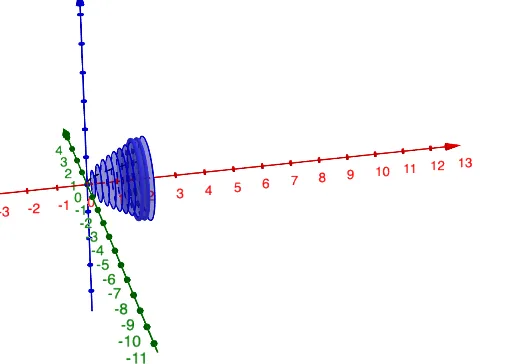
This example demonstrates how to calculate the volume of a solid of revolution using integration, involving calculus concepts such as integration, derivatives, and area. The construction uses GeoGebra commands like Integral, Segment, Circle, and Surface to model the rotating shape. It also explores parametric methods to show volume changes with different rotation angles. Suitable for high school students or college freshmen learning calculus and geometric applications, and for mathematical modeling exercises.
GeoGebra Commands & Parameters
Integral(g, 0, 6) → jTextfield(g) → inputBox1Integral(g, x) → qSegment((Value_x, 0), D) → sCircle((Value_x, 0, 0), g(Value_x), x + (0 * z) = 0) → pRectangleSum(g, a, b, Sections, 0) → iRectangleSum(h, a, b, Sections, 0) → lCylinder((Value_x, 0, 0), (Value_x - Increment, 0, 0), g(Value_x)) → k_4, k_2, k_3, k_4Surface(r, θ, xAxis) → d
AI Drawing Prompt Reference
Draw a diagram showing the volume calculation of a solid of revolution, demonstrating the application of integration and geometry. Include a function curve, its rotated volume calculated by integration, and the approximation using rectangles. Show the geometric shapes formed during rotation, such as the cylinder and torus, and the effect of changing the rotation angle parametrically.
The prompt above was compiled from the original drawing commands and is for reference only.