
Disk-Washer Method Volume Visualization
Loading the math board and drawing, please wait…
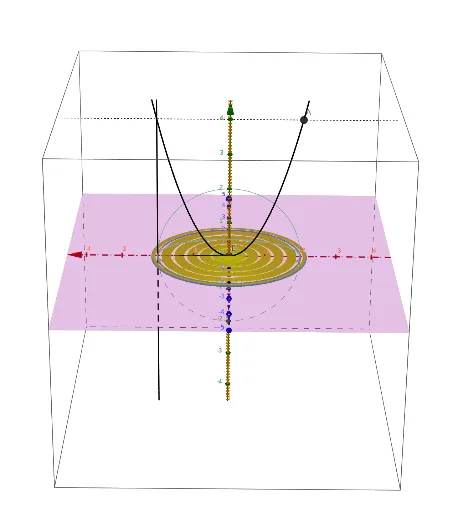
This example demonstrates the calculation of volume by rotating disk/washer cross sections. Users can set two functions, limits, axis of rotation, and number of cross sections to visualize the object's volume formation. Key math concepts include integration, derivatives, and function graphing. GeoGebra commands and objects used in construction are Intersect, Textfield, Min/Max, Segment, Circle, Plane, etc. Suitable for high school and above students learning volume calculation in calculus.
GeoGebra Commands & Parameters
Intersect(eqG_i, l_c) → P_{gc}Intersect(eqF_i, l_c) → P_{fc}, BTextfield(a) → inputBox_aTextfield(b) → inputBox_bMin(abs(rad_f), abs(rad_g)) → rad_iMax(abs(rad_f), abs(rad_g)) → rad_oSegment((0, x_{rotation}), (0, If[abs(rad_f) ≥ abs(rad_g), y(P_{fc}), y(P_{gc})])) → r_oSegment((0, x_{rotation}), (0, If[abs(rad_f) < abs(rad_g), y(P_{fc}), y(P_{gc})])) → r_iTextfield(n) → InputBox1Circle(P, rad_i, x = 0) → cs3_iCircle(P, rad_o, x = 0) → cs3_oPlane((x_{rotation}, y_i, rad_o), y + (0 * z) = y_i) → pln3dCircle(P, rad_i, x = 0) → cs3_{i2}SelectedIndex(lstTraceOpt) → lstTOIndexTextfield(eqF_i) → InputBox_fTextfield(eqG_i) → InputBox_gIntersect(eqF_i, l_a) → P_{fa},Intersect(eqF_i, l_b) → P_{fb}, AIntersect(eqG_i, l_a) → P_{ga}Intersect(eqG_i, l_b) → P_{gb}If(rad_o ≠ rad_f, If[abs(rad_f) ≟ rad_i, eqF_i, eqG_i], eqG_i) → rwash_{3in}If(rad_o ≠ rad_f, If[abs(rad_f) ≟ rad_o, eqF_i, eqG_i], eqF_i) → rwash_{3out}Intersect(rwash_{3in}, l_c, (1, 1)) → P_{ic}Intersect(rwash_{3out}, l_c, (1, 1)) → P_{oc}Segment(P_{oc}, P_{ic}) → r_{fg}Sequence(Segment[Rotate[P_{fc}, i°, l_r], Rotate[P_{gc}, i°, l_r]], i, 0, 360, 1) → wash_3Sequence(Rotate[P_{ic}, i°, l_r], i, 0, 360, 1) → wash_{3i}Sequence(Rotate[P_{oc}, i°, l_r], i, 0, 360, 1) → wash_{3o}
AI Drawing Prompt Reference
Create a 3D visualization of a solid of revolution using the disk-washer method. Show two function curves bounding a region, a rotation axis, and limits. Include multiple cross-sectional washers perpendicular to the axis, each with inner and outer circles. Distribute washers evenly along the axis, with adjustable count. Display the 3D surface formed by rotating the region, using semi-transparent or wireframe style to reveal internal structure. Mark key intersection points and radii.
The prompt above was compiled from the original drawing commands and is for reference only.