
Volume of a Parallelopiped
Loading the math board and drawing, please wait…
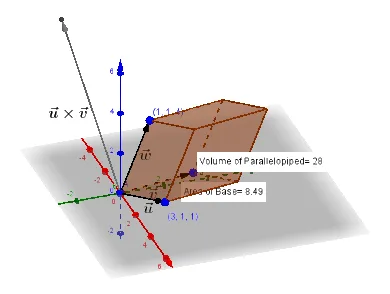
This example demonstrates the calculation and visualization of the volume of a parallelepiped. It involves core mathematical concepts such as vectors, points, lines, faces, volume, distance, and angles. The construction utilizes GeoGebra commands and objects like Vector, Line, Intersect, Prism, Midpoint, Volume, Point, Distance, Segment, OrthogonalLine, Angle, and PointIn. It is suitable for high school solid geometry teaching or self-learning to understand the principles of volume calculation.
GeoGebra Commands & Parameters
Vector(A, C) → uVector(A, B) → vVector(A, D) → wLine(D, v) → fLine(D, u) → gLine(B, w) → hIntersect(h, f) → ELine(E, g) → iLine(C, w) → jIntersect(g, j) → FLine(C, v) → kLine(B, u) → lIntersect(k, l) → GLine(F, k) → mIntersect(i, m) → HVector(C, G) → aVector(B, G) → bVector(B, E) → cVector(C, F) → dVector(G, H) → eVector(D, F) → nVector(D, E) → pVector(E, H) → qVector(F, H) → rPrism(A, C, G, B, D) → o, I, edgeAC, edgeCG, edgeBG, edgeAB, edgeAD, edgeCI, edgeGJ, edgeBK, edgeDI, edgeIJ, J, edgeJK, edgeDK, K, faceABGC, faceACID, faceCGJI, faceBGJK, faceABKD, faceDIJKMidpoint(A, C) → LMidpoint(A, B) → MMidpoint(A, D) → NVolume(o) → volumeoPoint(o) → PointoMidpoint(A, P) → ODistance(P, A) → distancePASegment(A, P) → tOrthogonalLine(D, t, space) → f_1Intersect(f_1, t) → QSegment(D, Q) → g_1Angle(D, Q, A) → αVector(A, Q) → u_1Midpoint(Q, A) → RDistance(A, Q) → distanceAQMidpoint(A, Q) →Distance(A, Q) → a_1Midpoint(A, Q) →PointIn(faceABGC) → PointfaceABGC