
Transformations of the Exponential Function: Shifts and Scalings
Loading the math board and drawing, please wait…
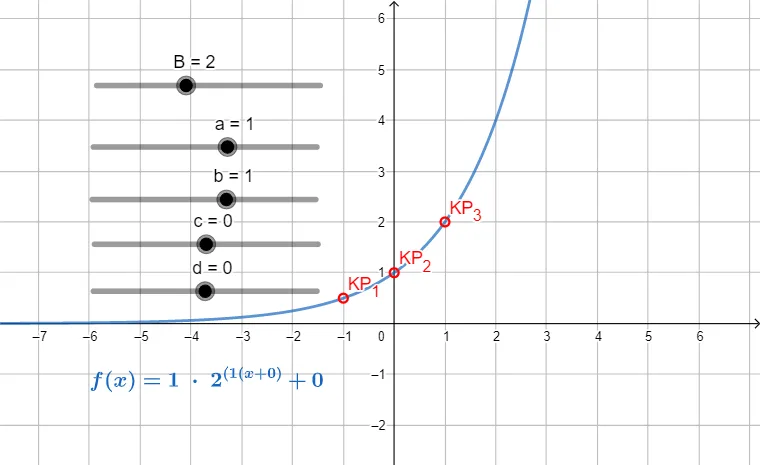
This GeoGebra example demonstrates how exponential function graphs change under transformations such as horizontal/vertical shifts and scalings, enabling a clear visual comparison between the original and transformed curves. The key mathematical concepts include the exponential function form, the influence of parameters on graph position and shape, and the idea of mapping a transformation to its geometric effect on the graph. Construction-wise, the model uses control objects and key points—B, a, b, c, d, f, g, and KP_{1}, KP_{2}, KP_{3}—to define the parameters and reference coordinates driving the transformation. A text label object (text1) is used to annotate important features so learners can connect the parameter changes to the resulting graph behavior. Suitable for high school through early university teaching, especially for interactive lessons on function transformations and graph interpretation.
GeoGebra Commands & Parameters
Numeric B(2)Numeric a(1)Numeric b(1)Numeric c(0)Numeric d(0)f(x) = B^(x)g(x) = (a * f((b * (x + c)))) + d(1 / b - c, (a * f(1)) + d)((-c), (a * f(0)) + d)((-(1 / b)) - c, (a * f(-1)) + d)
AI Drawing Prompt Reference
Create a graph comparing an exponential function and its parameter transformation. Set constants B=2, a=1, b=1, c=0, and d=0. Plot the base curve f(x)=B^x, then plot the transformed curve g(x)=a·f(b(x+c))+d on the same coordinate plane. Emphasize key reference points on g by marking three locations derived from the transformation: at x=1/b−c with y=(a·f(1))+d, at x=−c with y=(a·f(0))+d, and at x=−(1/b)−c with y=(a·f(−1))+d. Add a text annotation to connect these parameter-driven points to how the graph shifts and scales.
The prompt above was compiled from the original drawing commands and is for reference only.