
Volume Calculation Using Cylinders
Loading the math board and drawing, please wait…
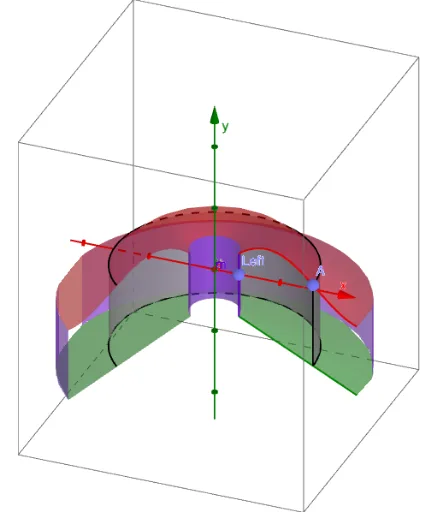
This example demonstrates how to calculate the volume of complex geometric shapes by combining or decomposing multiple cylinders. It involves core mathematical concepts such as integration in calculus, volume calculation in solid geometry, quadratic equations, and optimization problems. The construction uses GeoGebra commands and objects like Point, Segment, Textfield, Surface, If, CurveCartesian, and LaTeX, including sliders for parameter adjustment, function graphing, and intersection calculations. Suitable for high school and above students learning calculus, solid geometry, and volume calculation methods, as well as geometric probability in probability & statistics.
GeoGebra Commands & Parameters
Point(xAxis) → LeftPoint(xAxis) → RightPoint(f) → ASegment(B, A) → aTextfield(g) → inputBox1Textfield(h) → inputBox2Segment((x(Left), g(x(Left))), (x(Left), h(x(Left)))) → jSegment((x(Right), g(x(Right))), (x(Right), h(x(Right)))) → lSurface((x(A) * cos((-t))), u, (x(A) * sin((-t))), t, 0, β, u, Min[y(A), y(B)], Max[y(A), y(B)]) → dIf(α > 0, Surface[(u * cos((-t))), g(u), (u * sin((-t))), t, 0, α, u, x(Left), x(Right)]) → eSurface((u * cos((-t))), k(u), (u * sin((-t))), t, 0, α, u, x(Left), x(Right)) → iSurface((x(Left) * cos((-t))), u, (x(Left) * sin((-t))), t, 0, α, u, Min[g(x(Left)), h(x(Left))], Max[g(x(Left)), h(x(Left))]) → mSurface((x(Right) * cos((-t))), u, (x(Right) * sin((-t))), t, 0, α, u, Min[g(x(Right)), h(x(Right))], Max[g(x(Right)), h(x(Right))]) → nCurveCartesian((x(A) * cos((-t))), y(A), (x(A) * sin((-t))), t, 0, α) → bCurveCartesian((x(A) * cos((-t))), y(B), (x(A) * sin((-t))), t, 0, α) → cLaTeX((((("\text{V}=2\pi\int_{x_{\text{Left}}}^{x_{\text{Right}}}x\left[\left(" * g) * "\right)-\left(") * h) * "\right)\right] dx")) → text1