
Visual Sequence Generator (v2)
Loading the math board and drawing, please wait…
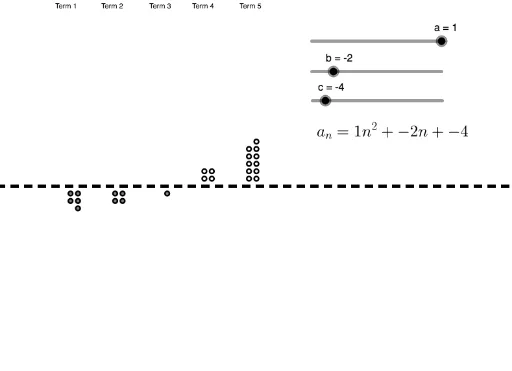
This example demonstrates how to generate visual patterns based on a given quadratic function. It involves core mathematical concepts like quadratic functions, sequences and series, random experiments, dilation, circumcircle, linear regression, and exponentiation. Construction highlights include using GeoGebra commands/objects such as Line and If. Suitable for high school mathematics instruction or exploration by math enthusiasts.
GeoGebra Commands & Parameters
Line(A, B) → fIf(s(1) ≥ 0, Sequence[Circle[(Mod[n, 2], floor(n / 2 + 0.5)), 0.3], n, 1, s(1)]) → L_2If(s(1) < 0, Sequence[Circle[(Mod[abs(n), 2], (-floor(abs(n) / 2 + 0.5))), 0.3], n, -1, s(1), -1]) → L_3If(s(2) ≥ 0, Sequence[Circle[(Mod[n, 2] + 6, floor(n / 2 + 0.5)), 0.3], n, 1, s(2)]) → L_4If(s(3) ≥ 0, Sequence[Circle[(Mod[n, 2] + 12, floor(n / 2 + 0.5)), 0.3], n, 1, s(3)]) → L_5If(s(4) ≥ 0, Sequence[Circle[(Mod[n, 2] + 18, floor(n / 2 + 0.5)), 0.3], n, 1, s(4)]) → L_6If(s(5) ≥ 0, Sequence[Circle[(Mod[n, 2] + 24, floor(n / 2 + 0.5)), 0.3], n, 1, s(5)]) → L_7If(s(2) < 0, Sequence[Circle[(Mod[abs(n), 2] + 6, (-floor(abs(n) / 2 + 0.5))), 0.3], n, -1, s(2), -1]) → L_8If(s(3) < 0, Sequence[Circle[(Mod[abs(n), 2] + 12, (-floor(abs(n) / 2 + 0.5))), 0.3], n, -1, s(3), -1]) → L_9If(s(4) < 0, Sequence[Circle[(Mod[abs(n), 2] + 18, (-floor(abs(n) / 2 + 0.5))), 0.3], n, -1, s(4), -1]) → L_{10}If(s(5) < 0, Sequence[Circle[(Mod[abs(n), 2] + 24, (-floor(abs(n) / 2 + 0.5))), 0.3], n, -1, s(5), -1]) → L_{11}
AI Drawing Prompt Reference
Draw a visual pattern based on a quadratic function, showcasing core mathematical concepts. Start by drawing a baseline, then generate two sets of sequences of circles based on input parameters, with positive and negative parameters creating circles at different positions, each set varying position by modulo 2 and distributed along the baseline to form a regular pattern.
The prompt above was compiled from the original drawing commands and is for reference only.