
Multiplication Practice: All Patterns
Loading the math board and drawing, please wait…
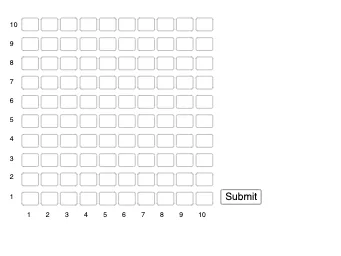
This interactive GeoGebra example is a multiplication drill tool that generates random multiplication problems and lets users type answers to practice arithmetic. It demonstrates how to build a self-checking quiz interface using text fields and sequences. The core mathematical concept is integer multiplication, covering various patterns from basic facts to more complex products. The construction uses the Textfield command to create input boxes, the Sequence command to generate multiple problem-answer pairs, and a Submit button to check responses. It is suitable for elementary and middle school students to improve mental math fluency, and can be used by teachers for classroom activities or by learners for independent practice.
GeoGebra Commands & Parameters
Textfield(answer_00) → InputBox1Textfield(answer_01) → InputBox2Textfield(answer_02) → InputBox3Textfield(answer_03) → InputBox4Textfield(answer_04) → InputBox5Textfield(answer_05) → InputBox6Textfield(answer_06) → InputBox7Textfield(answer_07) → InputBox8Textfield(answer_08) → InputBox9Textfield(answer_09) → InputBox10Textfield(answer_10) → InputBox11Textfield(answer_11) → InputBox12Textfield(answer_12) → InputBox13Textfield(answer_13) → InputBox14Textfield(answer_14) → InputBox15Textfield(answer_15) → InputBox16Textfield(answer_16) → InputBox17Textfield(answer_17) → InputBox18Textfield(answer_18) → InputBox19Textfield(answer_19) → InputBox20Textfield(answer_20) → InputBox21Textfield(answer_21) → InputBox22Textfield(answer_22) → InputBox23Textfield(answer_23) → InputBox24Textfield(answer_24) → InputBox25Textfield(answer_25) → InputBox26Textfield(answer_26) → InputBox27Textfield(answer_27) → InputBox28Textfield(answer_28) → InputBox29Textfield(answer_29) → InputBox30Textfield(answer_30) → InputBox31Textfield(answer_31) → InputBox32Textfield(answer_32) → InputBox33Textfield(answer_33) → InputBox34Textfield(answer_34) → InputBox35Textfield(answer_35) → InputBox36Textfield(answer_36) → InputBox37Textfield(answer_37) → InputBox38Textfield(answer_38) → InputBox39Textfield(answer_39) → InputBox40Textfield(answer_40) → InputBox41Textfield(answer_41) → InputBox42Textfield(answer_42) → InputBox43Textfield(answer_43) → InputBox44Textfield(answer_44) → InputBox45Textfield(answer_45) → InputBox46Textfield(answer_46) → InputBox47Textfield(answer_47) → InputBox48Textfield(answer_48) → InputBox49Textfield(answer_49) → InputBox50Textfield(answer_50) → InputBox51Textfield(answer_51) → InputBox52Textfield(answer_52) → InputBox53Textfield(answer_53) → InputBox54Textfield(answer_54) → InputBox55Textfield(answer_55) → InputBox56Textfield(answer_56) → InputBox57Textfield(answer_57) → InputBox58Textfield(answer_58) → InputBox59Textfield(answer_59) → InputBox60Textfield(answer_60) → InputBox61Textfield(answer_61) → InputBox62Textfield(answer_62) → InputBox63Textfield(answer_63) → InputBox64Textfield(answer_64) → InputBox65Textfield(answer_65) → InputBox66Textfield(answer_66) → InputBox67Textfield(answer_67) → InputBox68Textfield(answer_68) → InputBox69Textfield(answer_69) → InputBox70Textfield(answer_70) → InputBox71Textfield(answer_71) → InputBox72Textfield(answer_72) → InputBox73Textfield(answer_73) → InputBox74Textfield(answer_74) → InputBox75Textfield(answer_75) → InputBox76Textfield(answer_76) → InputBox77Textfield(answer_77) → InputBox78Textfield(answer_78) → InputBox79Textfield(answer_79) → InputBox80Textfield(answer_80) → InputBox81Textfield(answer_81) → InputBox82Textfield(answer_82) → InputBox83Textfield(answer_83) → InputBox84Textfield(answer_84) → InputBox85Textfield(answer_85) → InputBox86Textfield(answer_86) → InputBox87Textfield(answer_87) → InputBox88Textfield(answer_88) → InputBox89Textfield(answer_89) → InputBox90Textfield(answer_90) → InputBox91Textfield(answer_91) → InputBox92Textfield(answer_92) → InputBox93Textfield(answer_93) → InputBox94Textfield(answer_94) → InputBox95Textfield(answer_95) → InputBox96Textfield(answer_96) → InputBox97Textfield(answer_97) → InputBox98Textfield(answer_98) → InputBox99Textfield(answer_99) → InputBox100Sequence(Text[m, (((m - 1) * 10.25) + 1.2, 30)], m, 1, 10) → l1Sequence(Text[m, (-8, (m * 10.25) + 30)], m, 1, 10) → l2
AI Drawing Prompt Reference
Create an interactive math practice tool with multiple text input boxes for answers, display a series of random multiplication problems, generate multiple problem-answer pairs using a sequence, and set a submit button to check answers, suitable for elementary school students practicing integer multiplication, the interface should include multiple input boxes and a submit button.
The prompt above was compiled from the original drawing commands and is for reference only.