
Vertex Coloring by Šárka Voráčová
Loading the math board and drawing, please wait…
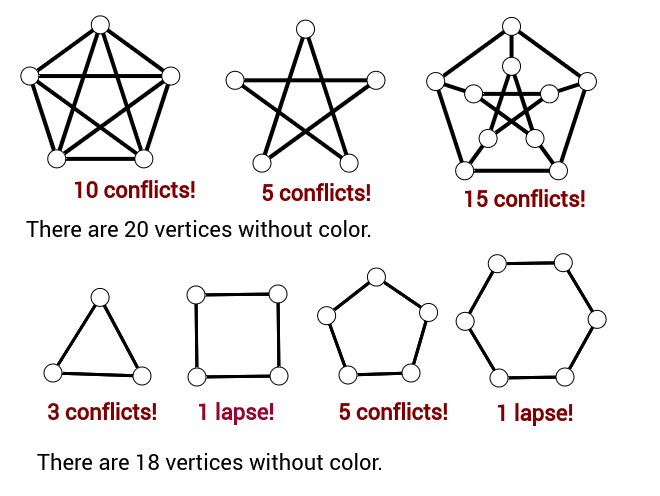
This example demonstrates how to use GeoGebra for vertex coloring. Key mathematical concepts include function graphs, polygons, and transformations. Using commands like Polygon, Segment, and Dilate, you can construct and color polygons. Suitable for high school mathematics education and learning.
GeoGebra Commands & Parameters
Polygon(V2, V3, 5) → mnohoúhelník1, f, g, h, i, j, V4, V5, V1Segment(V2, V3) → e4Segment(V3, V4) → e8Segment(V4, V5) → e6Segment(V5, V1) → e2Segment(V1, V2) → e10Segment(V2, V5) → e1Segment(V5, V3) → e7Segment(V3, V1) → e3Segment(V1, V4) → e9Segment(V4, V2) → e5Polygon(V6, V7, 5) → mnohoúhelník1_1, f_1, g_1, h_1, i_1, j_1, V8, V9, V10Segment(V6, V7) → e4_1Segment(V7, V8) → e8_1Segment(V8, V9) → e6_1Segment(V9, V10) → e2_1Segment(V10, V6) → e10_1Segment(V6, V9) → e1_1Segment(V9, V7) → e7_1Segment(V7, V10) → e3_1Segment(V10, V8) → e9_1Segment(V8, V6) → e5_1Segment(V6, V9) → aSegment(V9, V7) → bSegment(V7, V10) → cSegment(V10, V8) → dSegment(V8, V6) → ePolygon(V16, V17, 5) → mnohoúhelník1_2, f_2, g_2, h_2, i_2, j_2, V18, V19, V20Segment(V16, V17) → e4_2Segment(V17, V18) → e8_2Segment(V18, V19) → e6_2Segment(V19, V20) → e2_2Segment(V20, V16) → e10_2Segment(V16, V19) → e1_2Segment(V19, V17) → e7_2Segment(V17, V20) → e3_2Segment(V20, V18) → e9_2Segment(V18, V16) → e5_2Circle(V19, V20, V16) → kCenter(k) → stredDilate(V16, 2, stred) → V11Dilate(V20, 2, stred) → V15Dilate(V19, 2, stred) → V14Dilate(V18, 2, stred) → V13Dilate(V17, 2, stred) → V12Segment(V16, V19) → lSegment(V19, V17) → mSegment(V17, V20) → nnSegment(V20, V18) → pSegment(V18, V16) → qSegment(V20, V15) → rSegment(V19, V14) → sSegment(V18, V13) → tSegment(V16, V11) → a_1Segment(V17, V12) → b_1Segment(V11, V12) → c_1Segment(V12, V13) → d_1Segment(V13, V14) → e_1Segment(V14, V15) → k_1Segment(V15, V11) → l_1Polygon(M5, M6, 4) → mnohoúhelník2, m_1, n_1, p_1, q_1, M7, M4Polygon(M1, M3, 3) → mnohoúhelník3, r_1, s_1, t_1, M2Polygon(M10, M11, 5) → mnohoúhelník4, a_2, b_2, c_2, d_2, e_2, M12, M8, M9Polygon(M13, M14, 6) → mnohoúhelník5, k_2, M18, l_2, m_2, n_2, p_2, q_2, M15, M16, M17Sum(check5) → fm5CountIf(ip ≟ 0, ip, pais) → pbSum(check1p) → fm1Sum(check2) → fm2Sum(check4) → fm4Sum(check3) → fm3CountIf(ip ≟ 0, ip, pais2) → pb2Sum(check6) → fm6Sum(check7) → fm7